



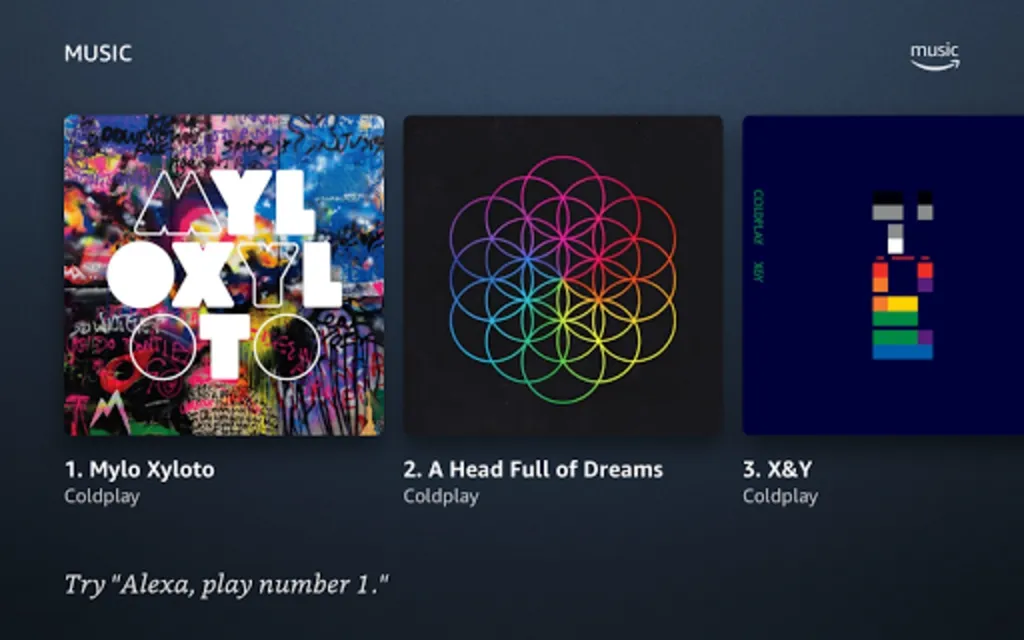




Experience seamless voice-controlled interaction with your Lenovo Smart Tab through Amazon Alexa – Show Mode for Lenovo. Engage with a full-screen visual interface, aptly named "Show Mode," offering an immersive experience in accessing a wide range of services, including music playback, video streaming, news briefs, and personalized content such as alarms, calendar events, timers, reminders, and weather updates. This app transforms your tablet into a more dynamic tool, responding to your voice commands when docked or handheld.
Ensure that your tablet's Default Voice Assistant setting is updated to the app's title for optimal performance. By utilizing Show Mode, enhance the daily routine with smart, hands-free convenience on your device.
Leverage this feature to integrate cutting-edge technology and ease into everyday activities. Keep abreast of the latest information and entertainment without lifting a finger, as your Lenovo Smart Tab adapts to become an even more efficient companion, all thanks to Show Mode's integration.
Content
Amazon Alexa – Show Mode for Lenovo transforms compatible Lenovo tablets into an interactive smart display experience, mirroring the functionality of Amazon's Echo Show devices. This mode leverages the tablet's existing hardware, including the screen, speakers, and microphone, to provide a hands-free, voice-controlled interface powered by Alexa. Essentially, Show Mode turns your Lenovo tablet into a versatile smart home hub.
The core functionality of Show Mode revolves around Alexa's voice recognition capabilities. Users can issue voice commands to perform a multitude of tasks, ranging from setting reminders and alarms to playing music and controlling compatible smart home devices. The visual interface complements the voice interaction, providing rich contextual information and interactive elements.
One of the primary benefits of Show Mode is hands-free convenience. Users can access information, manage their schedules, and control their smart home environment without needing to physically interact with the tablet. This is particularly useful in scenarios where hands are occupied, such as while cooking or getting ready in the morning.
Show Mode offers a personalized experience, adapting to individual user preferences and routines. Users can customize the display with personalized photos, choose preferred news sources, and tailor the information displayed on the home screen. This personalization enhances the user experience and makes the tablet feel like an integrated part of the home environment.
Communication is another key aspect of Show Mode. Users can make and receive voice calls, send messages, and even conduct video calls with compatible contacts. This functionality transforms the tablet into a communication hub, facilitating seamless connection with friends and family.
Entertainment is also a central focus of Show Mode. Users can stream music from various providers, listen to podcasts, and even watch videos on supported platforms. The tablet's larger screen and enhanced audio capabilities provide an immersive entertainment experience.
Smart home control is a significant advantage of Show Mode. Users can control compatible smart home devices, such as lights, thermostats, and security cameras, directly from the tablet using voice commands or the on-screen interface. This centralized control simplifies smart home management and enhances convenience.
Information access is readily available through Show Mode. Users can ask Alexa for information on a wide range of topics, from weather forecasts and news updates to recipes and sports scores. The visual interface displays relevant information in an easily digestible format.
Productivity features are also integrated into Show Mode. Users can create shopping lists, set reminders, manage calendars, and even access certain productivity apps. This functionality helps users stay organized and manage their daily tasks efficiently.
Accessibility is a key consideration in Show Mode's design. The voice-controlled interface makes the tablet accessible to users with limited mobility or dexterity. Furthermore, customizable display settings and font sizes cater to individual visual needs.
The integration with the Lenovo tablet's existing hardware enhances the Show Mode experience. The tablet's high-resolution display provides crisp visuals, while the integrated speakers deliver clear audio. The built-in microphone ensures accurate voice recognition.
Show Mode is constantly evolving, with regular updates adding new features and functionalities. This continuous improvement ensures that users have access to the latest advancements in voice assistant technology and smart home integration.
The combination of Alexa's intelligence and the Lenovo tablet's hardware creates a powerful and versatile smart display experience. Show Mode transforms the tablet into a central hub for information, entertainment, communication, and smart home control, enhancing convenience and connectivity in the modern home. The hands-free nature of the interface, combined with the personalized experience and constant updates, makes Show Mode a valuable addition to any compatible Lenovo tablet. It bridges the gap between a traditional tablet and a dedicated smart display, offering the best of both worlds in a single device.
Experience seamless voice-controlled interaction with your Lenovo Smart Tab through Amazon Alexa – Show Mode for Lenovo. Engage with a full-screen visual interface, aptly named "Show Mode," offering an immersive experience in accessing a wide range of services, including music playback, video streaming, news briefs, and personalized content such as alarms, calendar events, timers, reminders, and weather updates. This app transforms your tablet into a more dynamic tool, responding to your voice commands when docked or handheld.
Ensure that your tablet's Default Voice Assistant setting is updated to the app's title for optimal performance. By utilizing Show Mode, enhance the daily routine with smart, hands-free convenience on your device.
Leverage this feature to integrate cutting-edge technology and ease into everyday activities. Keep abreast of the latest information and entertainment without lifting a finger, as your Lenovo Smart Tab adapts to become an even more efficient companion, all thanks to Show Mode's integration.
Content
Amazon Alexa – Show Mode for Lenovo transforms compatible Lenovo tablets into an interactive smart display experience, mirroring the functionality of Amazon's Echo Show devices. This mode leverages the tablet's existing hardware, including the screen, speakers, and microphone, to provide a hands-free, voice-controlled interface powered by Alexa. Essentially, Show Mode turns your Lenovo tablet into a versatile smart home hub.
The core functionality of Show Mode revolves around Alexa's voice recognition capabilities. Users can issue voice commands to perform a multitude of tasks, ranging from setting reminders and alarms to playing music and controlling compatible smart home devices. The visual interface complements the voice interaction, providing rich contextual information and interactive elements.
One of the primary benefits of Show Mode is hands-free convenience. Users can access information, manage their schedules, and control their smart home environment without needing to physically interact with the tablet. This is particularly useful in scenarios where hands are occupied, such as while cooking or getting ready in the morning.
Show Mode offers a personalized experience, adapting to individual user preferences and routines. Users can customize the display with personalized photos, choose preferred news sources, and tailor the information displayed on the home screen. This personalization enhances the user experience and makes the tablet feel like an integrated part of the home environment.
Communication is another key aspect of Show Mode. Users can make and receive voice calls, send messages, and even conduct video calls with compatible contacts. This functionality transforms the tablet into a communication hub, facilitating seamless connection with friends and family.
Entertainment is also a central focus of Show Mode. Users can stream music from various providers, listen to podcasts, and even watch videos on supported platforms. The tablet's larger screen and enhanced audio capabilities provide an immersive entertainment experience.
Smart home control is a significant advantage of Show Mode. Users can control compatible smart home devices, such as lights, thermostats, and security cameras, directly from the tablet using voice commands or the on-screen interface. This centralized control simplifies smart home management and enhances convenience.
Information access is readily available through Show Mode. Users can ask Alexa for information on a wide range of topics, from weather forecasts and news updates to recipes and sports scores. The visual interface displays relevant information in an easily digestible format.
Productivity features are also integrated into Show Mode. Users can create shopping lists, set reminders, manage calendars, and even access certain productivity apps. This functionality helps users stay organized and manage their daily tasks efficiently.
Accessibility is a key consideration in Show Mode's design. The voice-controlled interface makes the tablet accessible to users with limited mobility or dexterity. Furthermore, customizable display settings and font sizes cater to individual visual needs.
The integration with the Lenovo tablet's existing hardware enhances the Show Mode experience. The tablet's high-resolution display provides crisp visuals, while the integrated speakers deliver clear audio. The built-in microphone ensures accurate voice recognition.
Show Mode is constantly evolving, with regular updates adding new features and functionalities. This continuous improvement ensures that users have access to the latest advancements in voice assistant technology and smart home integration.
The combination of Alexa's intelligence and the Lenovo tablet's hardware creates a powerful and versatile smart display experience. Show Mode transforms the tablet into a central hub for information, entertainment, communication, and smart home control, enhancing convenience and connectivity in the modern home. The hands-free nature of the interface, combined with the personalized experience and constant updates, makes Show Mode a valuable addition to any compatible Lenovo tablet. It bridges the gap between a traditional tablet and a dedicated smart display, offering the best of both worlds in a single device.