

Gira HomeServer/FacilityServer
A simple and elegant way of operating complex building technology while away or from any room at home: with the Gira HomeServer app, you have everything under control – with an Android device, via GSM, UMTS or WLAN, from outside or inside the building. The app acts as a client, communicating with the Gira HomeServer or FacilityServer: the Gira Interface displays all functions clearly and concisely and allows quick access to the building. The display is either horizontal or vertical and can be modified by simply rotating the device. Various profiles allow controlling different buildings such as a personal residence or company as well as various views of one building. In this way, different functions can be controlled from outside the building than from inside. Different views can also be created for users.
The most important features:
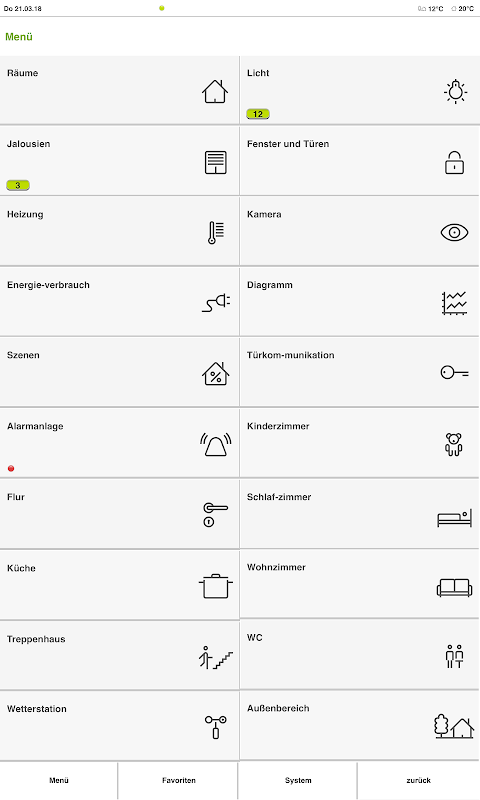
Main menu
The main menu displays all building functions. Date, time, current temperature and active functions can be viewed via the status bar. The jump back to the main menu is via the lower navigation bar.
Room list
All rooms of a property are assigned by floor. The overview of all applications installed in a room can be opened by touch.
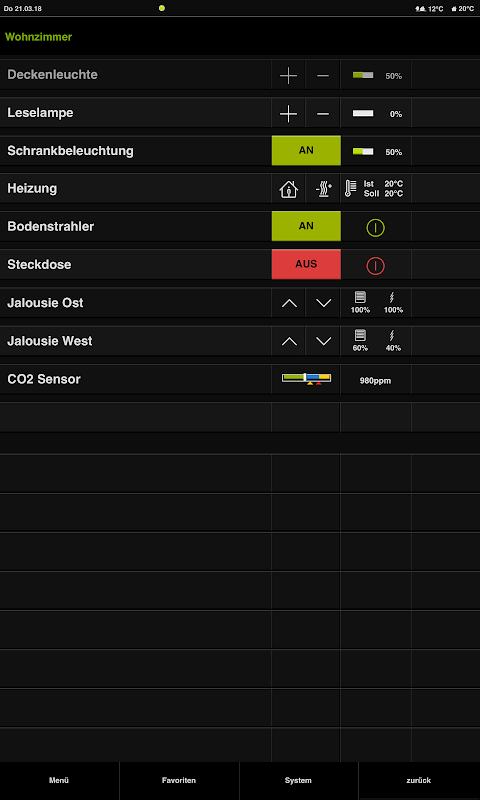
Room functions
The functions within a room and their status are recognizable at a glance and can be operated with a touch. For more complex functions such as the heating control system, a pop-up menu is opened. If the device is rotated by 90°, the horizontal format opens a further view of the time clock functions.
Time clock
A function can be adapted to personal requirements via a range of filter functions; random values are also possible in this way.
Diagrams
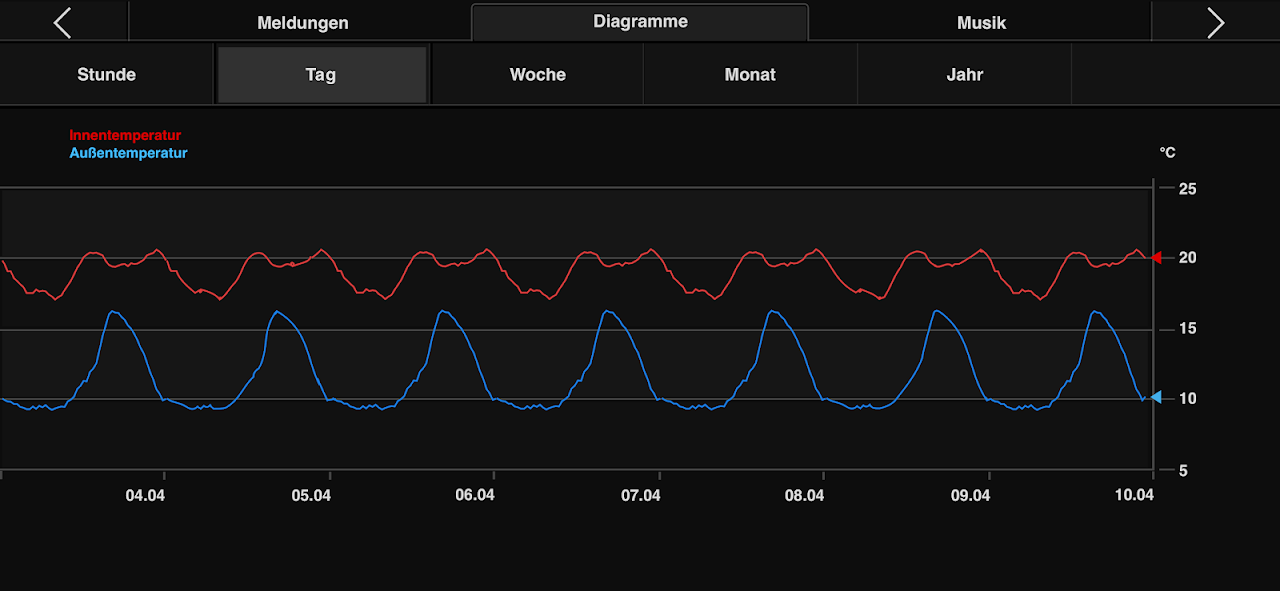
Diagrams enable the clear display of detected and evaluated consumption data by year, month, week, day or hour. If the unit is turned by 90°, the last active diagram appears in the horizontal format. Temperature differences, for example, can be visualised via multi-touch.
Messages
Alarm and fault messages, measured values and states of the various components integrated in the system are clearly displayed.
Weather data
The data from the weather station installed on the building such as wind speed, precipitation and temperatures are available at a glance.
Energy generation and fill levels
The energy generation of a photovoltaic system can be viewed just as easily as the fill level of a cistern for rain water.
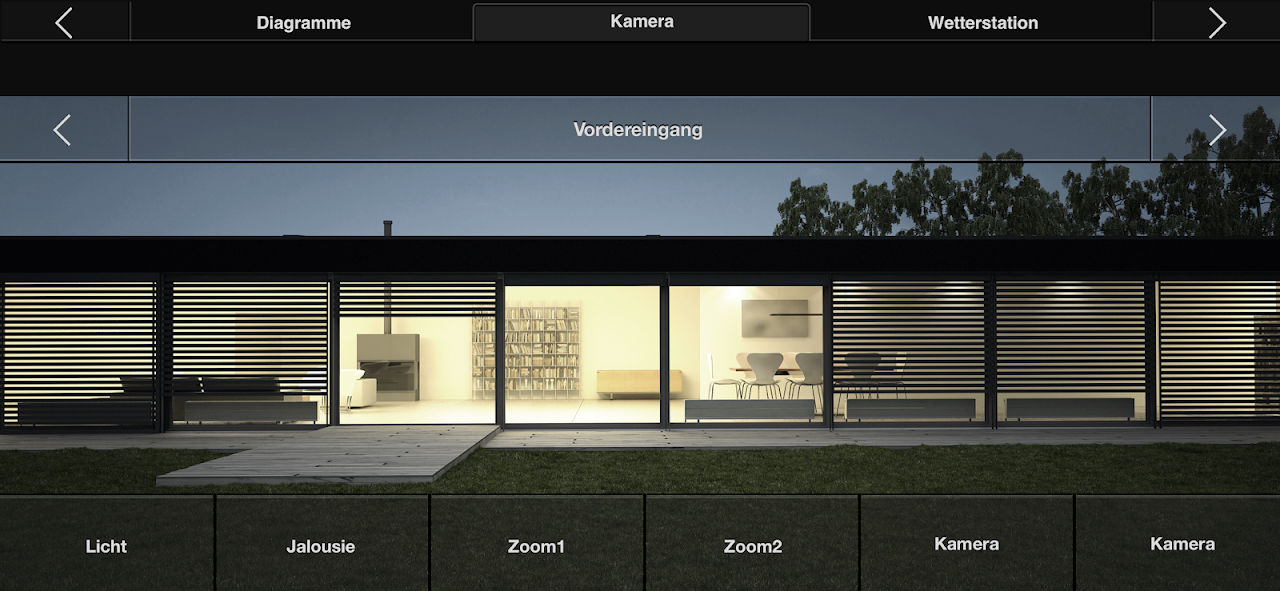
Camera
Cameras on the grounds can be called up with one operational step.
"Design 0" must also be activated in the QuadClient.
A list of specialists for intelligent building technology is available at www.gira.com/en/bezugsquellen
The core functionality of the Gira HomeServer/FacilityServer revolves around its logic engine. This engine processes information received from various sensors and devices, allowing for complex automation scenarios based on predefined rules and conditions. For instance, the system can automatically adjust lighting based on occupancy, time of day, or ambient light levels. Similarly, heating and cooling systems can be optimized for energy efficiency by considering factors such as weather forecasts and room temperature.
The system's versatility extends to security management, enabling integration with alarm systems, surveillance cameras, and access control devices. This allows for comprehensive monitoring and control, providing peace of mind and enhanced security for the property. Users can receive alerts and notifications in case of any security breaches or unusual activity.
Multimedia integration is another key feature of the Gira HomeServer/FacilityServer. It allows for seamless control of audio and video systems throughout the building. Users can create customized scenes for different occasions, adjusting lighting, music, and video playback with a single command. This integration enhances the entertainment experience and simplifies the management of multimedia devices.
The system's user interface is designed for intuitive operation, providing easy access to all functionalities. Users can control the system through various interfaces, including touch panels, smartphones, tablets, and web browsers. This flexibility allows for remote access and control, even when away from the property.
The Gira HomeServer/FacilityServer utilizes a bus system for communication between devices. This bus system ensures reliable and efficient data transmission, enabling seamless integration of various components. The system supports different communication protocols, allowing for compatibility with a wide range of devices from different manufacturers.
Scalability is a significant advantage of the Gira HomeServer/FacilityServer. The system can be expanded to accommodate growing needs, allowing for the integration of additional devices and functionalities as required. This flexibility makes it suitable for both small residential projects and large commercial installations.
Customization is another key aspect of the system. Users can create personalized settings and scenarios to suit their specific requirements. The system's logic engine allows for complex automation sequences, enabling tailored control over various building functions.
The Gira HomeServer/FacilityServer offers a range of benefits, including enhanced comfort, improved energy efficiency, and increased security. By automating various tasks and providing centralized control, the system simplifies building management and enhances the overall user experience.
The system's open architecture allows for integration with third-party devices and systems, further expanding its capabilities. This flexibility ensures compatibility with a wide range of products and technologies, providing users with greater choice and customization options.
The Gira HomeServer/FacilityServer is a comprehensive and versatile automation system that offers a wide range of functionalities for both residential and commercial applications. Its scalability, flexibility, and user-friendly interface make it a powerful tool for managing and controlling various aspects of a building, enhancing comfort, security, and energy efficiency. The system's open architecture and support for various communication protocols ensure compatibility with a wide range of devices, providing users with a truly integrated and customized automation solution. From lighting and heating to security and multimedia, the Gira HomeServer/FacilityServer offers a comprehensive platform for intelligent building control. Its ability to adapt to evolving needs and integrate with emerging technologies makes it a future-proof investment for any smart building project. The system's focus on user experience and intuitive operation ensures that managing complex building functionalities remains simple and accessible for everyone. With its robust features and comprehensive capabilities, the Gira HomeServer/FacilityServer stands as a leading solution in the field of building automation.
Gira HomeServer/FacilityServer
A simple and elegant way of operating complex building technology while away or from any room at home: with the Gira HomeServer app, you have everything under control – with an Android device, via GSM, UMTS or WLAN, from outside or inside the building. The app acts as a client, communicating with the Gira HomeServer or FacilityServer: the Gira Interface displays all functions clearly and concisely and allows quick access to the building. The display is either horizontal or vertical and can be modified by simply rotating the device. Various profiles allow controlling different buildings such as a personal residence or company as well as various views of one building. In this way, different functions can be controlled from outside the building than from inside. Different views can also be created for users.
The most important features:
Main menu
The main menu displays all building functions. Date, time, current temperature and active functions can be viewed via the status bar. The jump back to the main menu is via the lower navigation bar.
Room list
All rooms of a property are assigned by floor. The overview of all applications installed in a room can be opened by touch.
Room functions
The functions within a room and their status are recognizable at a glance and can be operated with a touch. For more complex functions such as the heating control system, a pop-up menu is opened. If the device is rotated by 90°, the horizontal format opens a further view of the time clock functions.
Time clock
A function can be adapted to personal requirements via a range of filter functions; random values are also possible in this way.
Diagrams
Diagrams enable the clear display of detected and evaluated consumption data by year, month, week, day or hour. If the unit is turned by 90°, the last active diagram appears in the horizontal format. Temperature differences, for example, can be visualised via multi-touch.
Messages
Alarm and fault messages, measured values and states of the various components integrated in the system are clearly displayed.
Weather data
The data from the weather station installed on the building such as wind speed, precipitation and temperatures are available at a glance.
Energy generation and fill levels
The energy generation of a photovoltaic system can be viewed just as easily as the fill level of a cistern for rain water.
Camera
Cameras on the grounds can be called up with one operational step.
"Design 0" must also be activated in the QuadClient.
A list of specialists for intelligent building technology is available at www.gira.com/en/bezugsquellen
The core functionality of the Gira HomeServer/FacilityServer revolves around its logic engine. This engine processes information received from various sensors and devices, allowing for complex automation scenarios based on predefined rules and conditions. For instance, the system can automatically adjust lighting based on occupancy, time of day, or ambient light levels. Similarly, heating and cooling systems can be optimized for energy efficiency by considering factors such as weather forecasts and room temperature.
The system's versatility extends to security management, enabling integration with alarm systems, surveillance cameras, and access control devices. This allows for comprehensive monitoring and control, providing peace of mind and enhanced security for the property. Users can receive alerts and notifications in case of any security breaches or unusual activity.
Multimedia integration is another key feature of the Gira HomeServer/FacilityServer. It allows for seamless control of audio and video systems throughout the building. Users can create customized scenes for different occasions, adjusting lighting, music, and video playback with a single command. This integration enhances the entertainment experience and simplifies the management of multimedia devices.
The system's user interface is designed for intuitive operation, providing easy access to all functionalities. Users can control the system through various interfaces, including touch panels, smartphones, tablets, and web browsers. This flexibility allows for remote access and control, even when away from the property.
The Gira HomeServer/FacilityServer utilizes a bus system for communication between devices. This bus system ensures reliable and efficient data transmission, enabling seamless integration of various components. The system supports different communication protocols, allowing for compatibility with a wide range of devices from different manufacturers.
Scalability is a significant advantage of the Gira HomeServer/FacilityServer. The system can be expanded to accommodate growing needs, allowing for the integration of additional devices and functionalities as required. This flexibility makes it suitable for both small residential projects and large commercial installations.
Customization is another key aspect of the system. Users can create personalized settings and scenarios to suit their specific requirements. The system's logic engine allows for complex automation sequences, enabling tailored control over various building functions.
The Gira HomeServer/FacilityServer offers a range of benefits, including enhanced comfort, improved energy efficiency, and increased security. By automating various tasks and providing centralized control, the system simplifies building management and enhances the overall user experience.
The system's open architecture allows for integration with third-party devices and systems, further expanding its capabilities. This flexibility ensures compatibility with a wide range of products and technologies, providing users with greater choice and customization options.
The Gira HomeServer/FacilityServer is a comprehensive and versatile automation system that offers a wide range of functionalities for both residential and commercial applications. Its scalability, flexibility, and user-friendly interface make it a powerful tool for managing and controlling various aspects of a building, enhancing comfort, security, and energy efficiency. The system's open architecture and support for various communication protocols ensure compatibility with a wide range of devices, providing users with a truly integrated and customized automation solution. From lighting and heating to security and multimedia, the Gira HomeServer/FacilityServer offers a comprehensive platform for intelligent building control. Its ability to adapt to evolving needs and integrate with emerging technologies makes it a future-proof investment for any smart building project. The system's focus on user experience and intuitive operation ensures that managing complex building functionalities remains simple and accessible for everyone. With its robust features and comprehensive capabilities, the Gira HomeServer/FacilityServer stands as a leading solution in the field of building automation.





