


Full of features you didn’t know you needed, but you won’t be able to live without.
Screen emails like you screen calls
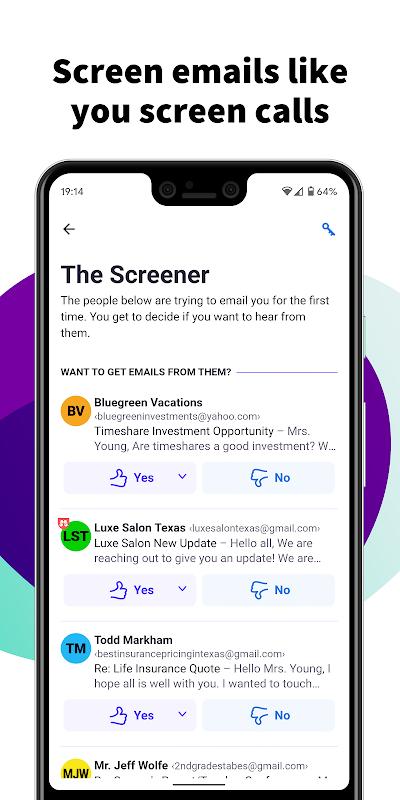
You screen your calls, so why can’t you screen your emails? With HEY, you can. HEY puts you in complete control of who’s allowed to email you. The first time someone emails you, you get to decide if you want to hear from them again.
Send an email to the web
Personal publishing has never been easier. Send an email to [email protected] from your personal HEY account to publish it on a webpage that the whole world can see. People can subscribe via email, or follow along via RSS.
The Imbox: It’s not a typo
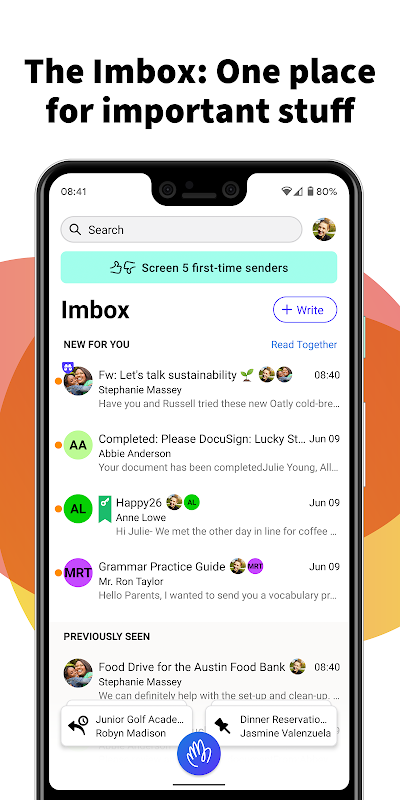
Everyone hates their bloated inbox, so HEY has a focused Imbox instead. Your Imbox is where important, immediate emails go from people or services you care about. No random receipts, no “I rarely read these” newsletters, and no special offers crowding out the stuff you really care about.
Track an email’s progress through stages
Things get messy when you’re handling a situation with numerous email threads and multiple steps. With HEY, you can use Workflows to define stages and visually track an email’s progress through a multi-step process.
Add a simple, searchable note to any contact
Need to remember details about a contact? Where you met, their phone number, when to follow-up, etc. Contact Notes are a great way to document details about a contact without having to go digging through your emails.
Quiet by default, loud at your discretion
HEY push notifications are off by default so your phone doesn’t steal your attention every time an inconsequential email hits your Imbox. However, HEY lets you selectively turn them on for specific contacts or threads so you don’t miss the things you really care about.
A built-in “Reply Later” workflow
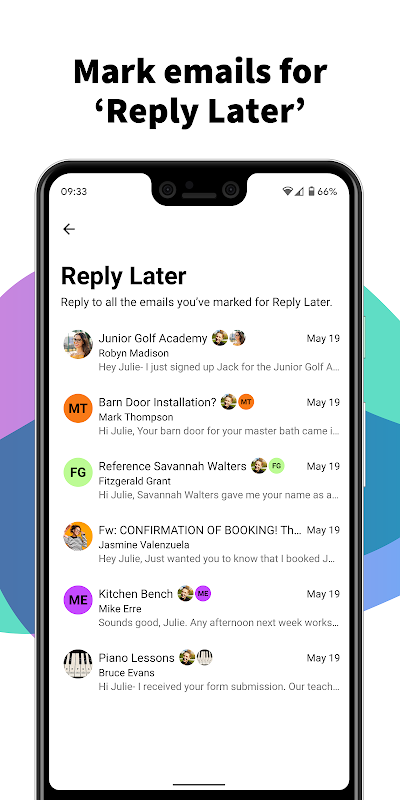
What if you need to reply, but you don’t have time right now? With HEY, just click the “Reply Later” button to move an email to a dedicated ‘Reply Later’ pile at the bottom of the screen so you don’t lose or forget it.
Just set it aside
Sometimes you get emails you need to reference later - travel info, handy links, numbers you need, etc. With HEY, you can ‘Set Aside’ any email in a neat little pile for easy access whenever you need it. At hand, but out of your face.
Blocking email spies 24-7-365
Many companies track which emails you open, how often you open them, and even where you were when you opened them. It’s a massive invasion of your privacy. HEY blocks these trackers and tells you who’s spying on you.
E pluribus unum
Doesn’t it suck when someone emails you separate threads about the same thing? Yup! With HEY, you can merge separate emails into one so you can keep everything together on a single page. No more dealing with fragmented conversations across separate threads.
Add some style to your Imbox with Cover Art
HEY is all about letting it flow, but some folks prefer an “out of sight, out of mind” approach. That’s where Cover Art comes in. Choose a style or upload your own image, and a cover will slide up over your previously seen emails. It’s a great way to add some life to your Imbox.
Link accounts and see all your email in one place
If you have multiple HEY accounts — like one for personal use and one for work — you can view them together without having to log in and out.
Spread ’em out, read ’em together
Let’s say you have 7 unread emails. Why do you have to open one, close one, open one, close one, open one, close one, and so on. It’s ridiculously inefficient. With HEY, you can open multiple emails at once and just scroll through them, just like you would a newsfeed. It’s a revolutionary way to read your emails. You’ll never go back to the old way.
And much more... Visit
hey.com
to learn more.
Introduction
HEY Email is an innovative email service developed by Basecamp, a renowned software company known for its productivity tools. Launched in 2020, HEY aims to revolutionize the email experience by addressing common frustrations associated with traditional email platforms.
Key Features
1. Focused Inbox:
HEY's "Focused Inbox" prioritizes important emails by automatically sorting them into three categories: "Imbox," "Feed," and "Paper Trail." Imbox contains high-priority emails from close contacts, while Feed includes newsletters, social notifications, and promotional messages. Paper Trail archives old or less important emails.
2. The Screener:
The Screener is a powerful tool that allows users to filter out unwanted emails before they reach their inbox. It uses machine learning to identify and block spam, phishing attempts, and emails from specific senders.
3. The Skimmer:
The Skimmer provides a quick and efficient way to scan through emails. It displays a summary of each email, including the sender, subject, and key content, allowing users to decide whether to open the full message or archive it.
4. The Feed:
The Feed is a separate section within HEY that collects non-urgent emails such as newsletters, social media updates, and promotional messages. Users can customize the Feed to prioritize certain senders or categories.
5. The Paper Trail:
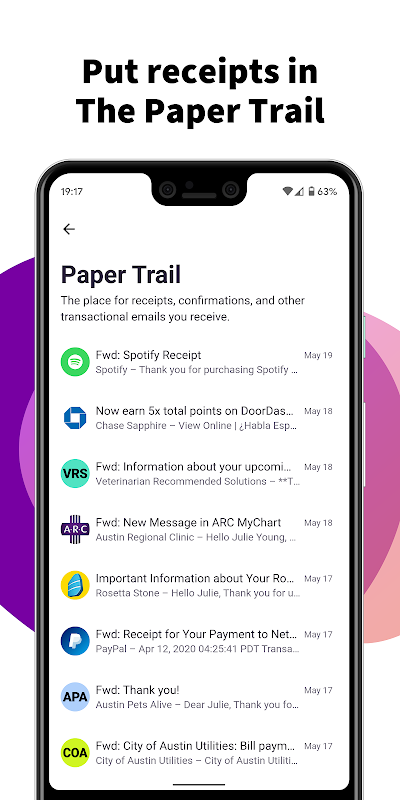
The Paper Trail is an archive for old or less important emails. It stores messages that have been automatically filtered out or manually archived. Users can easily search and retrieve emails from the Paper Trail when needed.
6. End-to-End Encryption:
HEY implements end-to-end encryption to ensure the privacy and security of users' emails. All emails are encrypted both at rest and in transit, protecting them from unauthorized access.
7. No Ads or Tracking:
HEY is committed to providing a user-centric experience. It does not display any ads or track user activity. The company's revenue model relies solely on subscription fees.
Benefits
1. Improved Focus and Productivity:
HEY's Focused Inbox helps users stay organized and prioritize their emails. By filtering out distractions and focusing on important messages, it improves productivity and reduces stress.
2. Enhanced Privacy and Security:
End-to-end encryption and the absence of ads and tracking ensure that users' emails and personal data remain private and secure.
3. Streamlined Email Management:
The Skimmer and the Feed provide efficient ways to manage emails without wasting time on unnecessary distractions. The Paper Trail keeps old emails organized and accessible.
4. Uncluttered and Aesthetically Pleasing Interface:
HEY's interface is designed to be clean, uncluttered, and aesthetically pleasing. It enhances the user experience and makes email management more enjoyable.
5. Ethical and User-Centric Approach:
HEY's commitment to user privacy, the absence of ads, and its transparent revenue model demonstrate the company's ethical and user-centric approach to email.
Conclusion
HEY Email is a transformative email service that addresses the shortcomings of traditional email platforms. Its innovative features, such as the Focused Inbox, the Screener, and the Feed, empower users to take control of their inboxes and improve their email experience. HEY's commitment to privacy, security, and user-centricity makes it an ideal choice for individuals and organizations seeking a better way to manage their emails.
Full of features you didn’t know you needed, but you won’t be able to live without.
Screen emails like you screen calls
You screen your calls, so why can’t you screen your emails? With HEY, you can. HEY puts you in complete control of who’s allowed to email you. The first time someone emails you, you get to decide if you want to hear from them again.
Send an email to the web
Personal publishing has never been easier. Send an email to [email protected] from your personal HEY account to publish it on a webpage that the whole world can see. People can subscribe via email, or follow along via RSS.
The Imbox: It’s not a typo
Everyone hates their bloated inbox, so HEY has a focused Imbox instead. Your Imbox is where important, immediate emails go from people or services you care about. No random receipts, no “I rarely read these” newsletters, and no special offers crowding out the stuff you really care about.
Track an email’s progress through stages
Things get messy when you’re handling a situation with numerous email threads and multiple steps. With HEY, you can use Workflows to define stages and visually track an email’s progress through a multi-step process.
Add a simple, searchable note to any contact
Need to remember details about a contact? Where you met, their phone number, when to follow-up, etc. Contact Notes are a great way to document details about a contact without having to go digging through your emails.
Quiet by default, loud at your discretion
HEY push notifications are off by default so your phone doesn’t steal your attention every time an inconsequential email hits your Imbox. However, HEY lets you selectively turn them on for specific contacts or threads so you don’t miss the things you really care about.
A built-in “Reply Later” workflow
What if you need to reply, but you don’t have time right now? With HEY, just click the “Reply Later” button to move an email to a dedicated ‘Reply Later’ pile at the bottom of the screen so you don’t lose or forget it.
Just set it aside
Sometimes you get emails you need to reference later - travel info, handy links, numbers you need, etc. With HEY, you can ‘Set Aside’ any email in a neat little pile for easy access whenever you need it. At hand, but out of your face.
Blocking email spies 24-7-365
Many companies track which emails you open, how often you open them, and even where you were when you opened them. It’s a massive invasion of your privacy. HEY blocks these trackers and tells you who’s spying on you.
E pluribus unum
Doesn’t it suck when someone emails you separate threads about the same thing? Yup! With HEY, you can merge separate emails into one so you can keep everything together on a single page. No more dealing with fragmented conversations across separate threads.
Add some style to your Imbox with Cover Art
HEY is all about letting it flow, but some folks prefer an “out of sight, out of mind” approach. That’s where Cover Art comes in. Choose a style or upload your own image, and a cover will slide up over your previously seen emails. It’s a great way to add some life to your Imbox.
Link accounts and see all your email in one place
If you have multiple HEY accounts — like one for personal use and one for work — you can view them together without having to log in and out.
Spread ’em out, read ’em together
Let’s say you have 7 unread emails. Why do you have to open one, close one, open one, close one, open one, close one, and so on. It’s ridiculously inefficient. With HEY, you can open multiple emails at once and just scroll through them, just like you would a newsfeed. It’s a revolutionary way to read your emails. You’ll never go back to the old way.
And much more... Visit
hey.com
to learn more.
Introduction
HEY Email is an innovative email service developed by Basecamp, a renowned software company known for its productivity tools. Launched in 2020, HEY aims to revolutionize the email experience by addressing common frustrations associated with traditional email platforms.
Key Features
1. Focused Inbox:
HEY's "Focused Inbox" prioritizes important emails by automatically sorting them into three categories: "Imbox," "Feed," and "Paper Trail." Imbox contains high-priority emails from close contacts, while Feed includes newsletters, social notifications, and promotional messages. Paper Trail archives old or less important emails.
2. The Screener:
The Screener is a powerful tool that allows users to filter out unwanted emails before they reach their inbox. It uses machine learning to identify and block spam, phishing attempts, and emails from specific senders.
3. The Skimmer:
The Skimmer provides a quick and efficient way to scan through emails. It displays a summary of each email, including the sender, subject, and key content, allowing users to decide whether to open the full message or archive it.
4. The Feed:
The Feed is a separate section within HEY that collects non-urgent emails such as newsletters, social media updates, and promotional messages. Users can customize the Feed to prioritize certain senders or categories.
5. The Paper Trail:
The Paper Trail is an archive for old or less important emails. It stores messages that have been automatically filtered out or manually archived. Users can easily search and retrieve emails from the Paper Trail when needed.
6. End-to-End Encryption:
HEY implements end-to-end encryption to ensure the privacy and security of users' emails. All emails are encrypted both at rest and in transit, protecting them from unauthorized access.
7. No Ads or Tracking:
HEY is committed to providing a user-centric experience. It does not display any ads or track user activity. The company's revenue model relies solely on subscription fees.
Benefits
1. Improved Focus and Productivity:
HEY's Focused Inbox helps users stay organized and prioritize their emails. By filtering out distractions and focusing on important messages, it improves productivity and reduces stress.
2. Enhanced Privacy and Security:
End-to-end encryption and the absence of ads and tracking ensure that users' emails and personal data remain private and secure.
3. Streamlined Email Management:
The Skimmer and the Feed provide efficient ways to manage emails without wasting time on unnecessary distractions. The Paper Trail keeps old emails organized and accessible.
4. Uncluttered and Aesthetically Pleasing Interface:
HEY's interface is designed to be clean, uncluttered, and aesthetically pleasing. It enhances the user experience and makes email management more enjoyable.
5. Ethical and User-Centric Approach:
HEY's commitment to user privacy, the absence of ads, and its transparent revenue model demonstrate the company's ethical and user-centric approach to email.
Conclusion
HEY Email is a transformative email service that addresses the shortcomings of traditional email platforms. Its innovative features, such as the Focused Inbox, the Screener, and the Feed, empower users to take control of their inboxes and improve their email experience. HEY's commitment to privacy, security, and user-centricity makes it an ideal choice for individuals and organizations seeking a better way to manage their emails.





