




With the increasing use of variable work schedules, the demand for shift planning apps is growing. Our app, Work Schedule & Alarm Clock, is the perfect solution for people working in businesses of any size. With its help, you can easily create and manage employees' work schedules, set notifications, and track their working hours.
Key features:
✓ Creating and managing work schedules: Our app allows you to effortlessly create and manage shift schedules of any complexity. You can create both recurring and individual schedules and mark working shifts as well as vacations, sick leaves, and more.
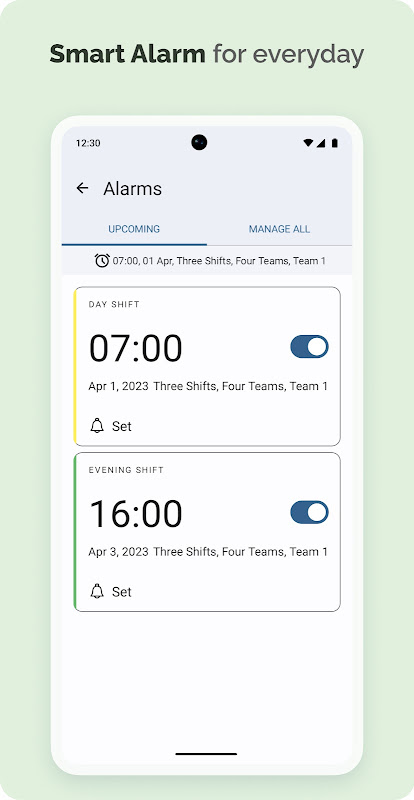
✓ Setting alarms: Our app lets you set multiple alarms for each shift. It's a great way to wake up on time without manually managing your alarms.
✓ Tracking working hours: Our app tracks the working shifts and hours according to your schedule, and you can view this information on the statistics screen.
Key functions:
✓ Configuring different types of work shifts (day shift, night shift, evening shift, weekends, sick leaves, vacations, etc.).
✓ Each shift can have multiple alarms.
✓ Option to use an external alarm (native Android alarm or any downloaded alarm app that supports this feature).
✓ Creating recurring schedules for your business. You can view not only your own schedule but also the schedules of all teams and how they change.
✓ Instantly seeing which team works in which shift for any given date.
✓ Over 25 pre-made templates (day-night-48, five-day week, three-day shift, four-team three-shift, long-short week, DuPont, continental, and many more).
✓ Individual schedules.
✓ Convenient alarm management. You can easily disable alarms for the duration of your vacation with a single switch.
✓ Comparing multiple schedules on one screen, making it easy to find overlapping days off.
✓ Desktop widgets. You can see your schedule without opening the app.
✓ Calculation of working hours (daytime hours, evening hours, night hours). Statistics of hours worked.
✓ Exporting schedules to PDF for printing.
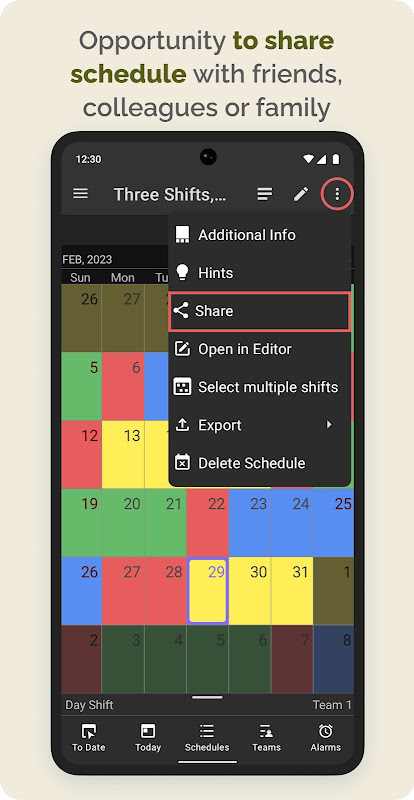
✓ Ability to share schedules with colleagues or loved ones.
✓ Cloud storage for your schedules. If you change your phone, simply log in to your account.
✓ Customizing colors for shifts and text in the calendar.
✓ Exporting to Google Calendar.
✓ Ability to add payday dates.
Upcoming features:
☑ Enhanced integration with Google Calendar.
☑ Hourly rate configuration and salary calculation.
☑ Indication of public holidays.
Please leave your suggestions for future features in the comments section here on Google Play or choose a convenient method in the Support section.
Overview
Shift Schedule (Roster) & Alarm is a mobile application designed to assist users in managing their work schedules and setting up timely alarms. It is a comprehensive tool that offers a range of features to help users stay organized, punctual, and informed about their work shifts.
Key Features
Shift Management:
* Create and manage multiple work schedules (rosters) with custom shifts, start and end times, and break durations.
* View upcoming shifts in a clear and concise calendar format.
* Add notes and reminders to specific shifts to keep track of important details.
Alarm Functionality:
* Set multiple alarms for different shifts, ensuring timely wake-up calls.
* Customize alarm settings, including snooze duration, alarm volume, and vibration.
* Receive notifications for upcoming shifts and other important events.
Notifications and Alerts:
* Receive notifications for schedule changes, shift reminders, and alarm triggers.
* Stay informed about any updates or changes to your work schedule.
* Set up custom alerts for specific events or deadlines.
Synchronization and Backup:
* Sync your schedules and alarms across multiple devices for seamless access.
* Back up your data to ensure safekeeping and prevent data loss.
* Share schedules with colleagues or family members for better coordination.
Customization and Appearance:
* Personalize the app's appearance with customizable themes and colors.
* Choose from a variety of alarm sounds and ringtones to suit your preferences.
* Adjust the app's settings to optimize its functionality and user experience.
Additional Features:
* Add overtime hours and other adjustments to your shifts.
* Track your worked hours and compare them to scheduled hours.
* Generate reports and export schedules in various formats.
* Receive weather updates and traffic alerts for your commute.
Benefits
* Improved time management and punctuality
* Reduced stress and anxiety related to work schedules
* Enhanced communication and coordination with colleagues
* Increased productivity and efficiency
* Peace of mind and a sense of organization
Conclusion
Shift Schedule (Roster) & Alarm is an indispensable tool for anyone who needs to manage their work schedules and stay on top of their appointments. Its comprehensive features, user-friendly interface, and reliable notifications make it an essential companion for professionals, shift workers, and anyone who values punctuality and organization.
With the increasing use of variable work schedules, the demand for shift planning apps is growing. Our app, Work Schedule & Alarm Clock, is the perfect solution for people working in businesses of any size. With its help, you can easily create and manage employees' work schedules, set notifications, and track their working hours.
Key features:
✓ Creating and managing work schedules: Our app allows you to effortlessly create and manage shift schedules of any complexity. You can create both recurring and individual schedules and mark working shifts as well as vacations, sick leaves, and more.
✓ Setting alarms: Our app lets you set multiple alarms for each shift. It's a great way to wake up on time without manually managing your alarms.
✓ Tracking working hours: Our app tracks the working shifts and hours according to your schedule, and you can view this information on the statistics screen.
Key functions:
✓ Configuring different types of work shifts (day shift, night shift, evening shift, weekends, sick leaves, vacations, etc.).
✓ Each shift can have multiple alarms.
✓ Option to use an external alarm (native Android alarm or any downloaded alarm app that supports this feature).
✓ Creating recurring schedules for your business. You can view not only your own schedule but also the schedules of all teams and how they change.
✓ Instantly seeing which team works in which shift for any given date.
✓ Over 25 pre-made templates (day-night-48, five-day week, three-day shift, four-team three-shift, long-short week, DuPont, continental, and many more).
✓ Individual schedules.
✓ Convenient alarm management. You can easily disable alarms for the duration of your vacation with a single switch.
✓ Comparing multiple schedules on one screen, making it easy to find overlapping days off.
✓ Desktop widgets. You can see your schedule without opening the app.
✓ Calculation of working hours (daytime hours, evening hours, night hours). Statistics of hours worked.
✓ Exporting schedules to PDF for printing.
✓ Ability to share schedules with colleagues or loved ones.
✓ Cloud storage for your schedules. If you change your phone, simply log in to your account.
✓ Customizing colors for shifts and text in the calendar.
✓ Exporting to Google Calendar.
✓ Ability to add payday dates.
Upcoming features:
☑ Enhanced integration with Google Calendar.
☑ Hourly rate configuration and salary calculation.
☑ Indication of public holidays.
Please leave your suggestions for future features in the comments section here on Google Play or choose a convenient method in the Support section.
Overview
Shift Schedule (Roster) & Alarm is a mobile application designed to assist users in managing their work schedules and setting up timely alarms. It is a comprehensive tool that offers a range of features to help users stay organized, punctual, and informed about their work shifts.
Key Features
Shift Management:
* Create and manage multiple work schedules (rosters) with custom shifts, start and end times, and break durations.
* View upcoming shifts in a clear and concise calendar format.
* Add notes and reminders to specific shifts to keep track of important details.
Alarm Functionality:
* Set multiple alarms for different shifts, ensuring timely wake-up calls.
* Customize alarm settings, including snooze duration, alarm volume, and vibration.
* Receive notifications for upcoming shifts and other important events.
Notifications and Alerts:
* Receive notifications for schedule changes, shift reminders, and alarm triggers.
* Stay informed about any updates or changes to your work schedule.
* Set up custom alerts for specific events or deadlines.
Synchronization and Backup:
* Sync your schedules and alarms across multiple devices for seamless access.
* Back up your data to ensure safekeeping and prevent data loss.
* Share schedules with colleagues or family members for better coordination.
Customization and Appearance:
* Personalize the app's appearance with customizable themes and colors.
* Choose from a variety of alarm sounds and ringtones to suit your preferences.
* Adjust the app's settings to optimize its functionality and user experience.
Additional Features:
* Add overtime hours and other adjustments to your shifts.
* Track your worked hours and compare them to scheduled hours.
* Generate reports and export schedules in various formats.
* Receive weather updates and traffic alerts for your commute.
Benefits
* Improved time management and punctuality
* Reduced stress and anxiety related to work schedules
* Enhanced communication and coordination with colleagues
* Increased productivity and efficiency
* Peace of mind and a sense of organization
Conclusion
Shift Schedule (Roster) & Alarm is an indispensable tool for anyone who needs to manage their work schedules and stay on top of their appointments. Its comprehensive features, user-friendly interface, and reliable notifications make it an essential companion for professionals, shift workers, and anyone who values punctuality and organization.





