




Touch Macro Pro allows for programming routine tasks, which can then be carried out automatically. It is a flexible piece of software that may perform tasks such as group repetition, comparing photos, and discovering particular data. It can perform complex operations, rapid clicking, and locate and select images displayed on the screen.
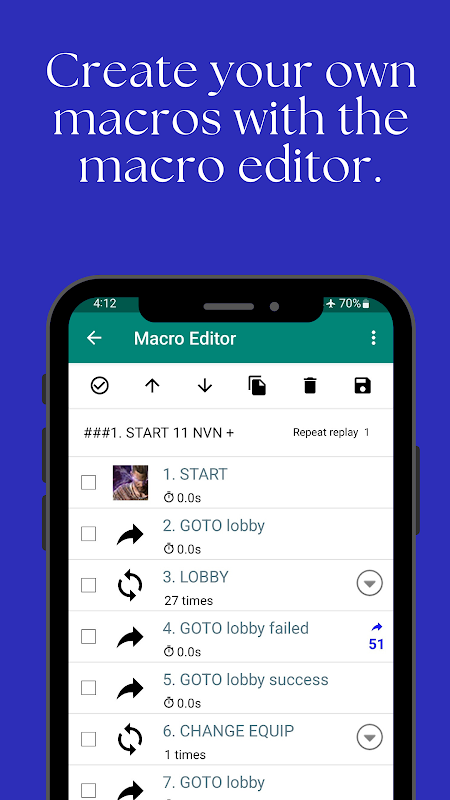
The basic macro editor makes the process of altering macros easier to accomplish. The following permissions must be granted for this program to take advantage of touch and gesture controls. Utilizing this software, your touch screen’s functionality can be automated.
- Accessibility Service
TOUCH MACRO Pro is a touch automation application. This application requires accessibility permissions to perform touch and gestures.
- Android developer option or ROOT
Accessibility services are not available on Android 7.0 and lower. So you need to enable developer options or ROOT.
- Emulator
This app can be run on a computer emulator.
Website
https://touchmacro.github.io/TouchMacro
Touch Macro Pro - Auto Clicker is a powerful automation tool for Android devices that allows users to automate repetitive tasks and improve their productivity. It offers a comprehensive set of features designed to make automating tasks effortless, including:
Record and Playback Macros:
Touch Macro Pro enables users to record a sequence of taps, swipes, and gestures, which can then be played back repeatedly. This feature is ideal for automating tasks such as opening specific apps, playing games, or filling out forms.
Multiple Macros and Scheduling:
Users can create and manage multiple macros, each with its own set of actions. Macros can be scheduled to run at specific times or intervals, ensuring that tasks are completed automatically without manual intervention.
Advanced Settings:
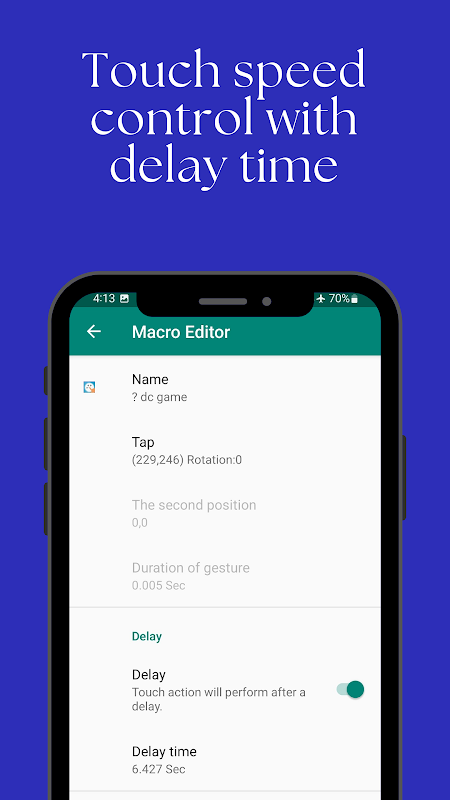
Touch Macro Pro provides advanced settings for fine-tuning macros, such as loop counts, playback speed, and delay between actions. This level of customization allows users to tailor macros to their specific needs and preferences.
Intuitive User Interface:
The app features a user-friendly interface that makes it easy to create, edit, and manage macros. The drag-and-drop interface simplifies the process of adding and arranging actions within macros.
Accessibility Features:
Touch Macro Pro includes accessibility features to assist users with disabilities. These features allow users to control macros using external devices such as joysticks or switches.
Security and Privacy:
The app prioritizes security and privacy by not requiring root access or accessing sensitive user data. Macros are stored locally on the device, ensuring that personal information remains private.
Applications:
* Gaming: Automating repetitive tasks in games, such as grinding levels or farming resources.
* Social Media: Scheduling posts, liking comments, and following accounts automatically.
* Productivity: Automating tasks such as filling out forms, sending emails, or setting reminders.
* Accessibility: Assisting users with disabilities by automating tasks that may be difficult or impossible to perform manually.
* Testing: Automating repetitive tasks during software or app testing to improve efficiency.
Conclusion:
Touch Macro Pro - Auto Clicker is an indispensable tool for Android users seeking to automate tasks, enhance productivity, and streamline their mobile experience. Its comprehensive feature set, intuitive interface, and accessibility options make it the ideal solution for automating a wide range of tasks on Android devices.
Touch Macro Pro allows for programming routine tasks, which can then be carried out automatically. It is a flexible piece of software that may perform tasks such as group repetition, comparing photos, and discovering particular data. It can perform complex operations, rapid clicking, and locate and select images displayed on the screen.
The basic macro editor makes the process of altering macros easier to accomplish. The following permissions must be granted for this program to take advantage of touch and gesture controls. Utilizing this software, your touch screen’s functionality can be automated.
- Accessibility Service
TOUCH MACRO Pro is a touch automation application. This application requires accessibility permissions to perform touch and gestures.
- Android developer option or ROOT
Accessibility services are not available on Android 7.0 and lower. So you need to enable developer options or ROOT.
- Emulator
This app can be run on a computer emulator.
Website
https://touchmacro.github.io/TouchMacro
Touch Macro Pro - Auto Clicker is a powerful automation tool for Android devices that allows users to automate repetitive tasks and improve their productivity. It offers a comprehensive set of features designed to make automating tasks effortless, including:
Record and Playback Macros:
Touch Macro Pro enables users to record a sequence of taps, swipes, and gestures, which can then be played back repeatedly. This feature is ideal for automating tasks such as opening specific apps, playing games, or filling out forms.
Multiple Macros and Scheduling:
Users can create and manage multiple macros, each with its own set of actions. Macros can be scheduled to run at specific times or intervals, ensuring that tasks are completed automatically without manual intervention.
Advanced Settings:
Touch Macro Pro provides advanced settings for fine-tuning macros, such as loop counts, playback speed, and delay between actions. This level of customization allows users to tailor macros to their specific needs and preferences.
Intuitive User Interface:
The app features a user-friendly interface that makes it easy to create, edit, and manage macros. The drag-and-drop interface simplifies the process of adding and arranging actions within macros.
Accessibility Features:
Touch Macro Pro includes accessibility features to assist users with disabilities. These features allow users to control macros using external devices such as joysticks or switches.
Security and Privacy:
The app prioritizes security and privacy by not requiring root access or accessing sensitive user data. Macros are stored locally on the device, ensuring that personal information remains private.
Applications:
* Gaming: Automating repetitive tasks in games, such as grinding levels or farming resources.
* Social Media: Scheduling posts, liking comments, and following accounts automatically.
* Productivity: Automating tasks such as filling out forms, sending emails, or setting reminders.
* Accessibility: Assisting users with disabilities by automating tasks that may be difficult or impossible to perform manually.
* Testing: Automating repetitive tasks during software or app testing to improve efficiency.
Conclusion:
Touch Macro Pro - Auto Clicker is an indispensable tool for Android users seeking to automate tasks, enhance productivity, and streamline their mobile experience. Its comprehensive feature set, intuitive interface, and accessibility options make it the ideal solution for automating a wide range of tasks on Android devices.





