


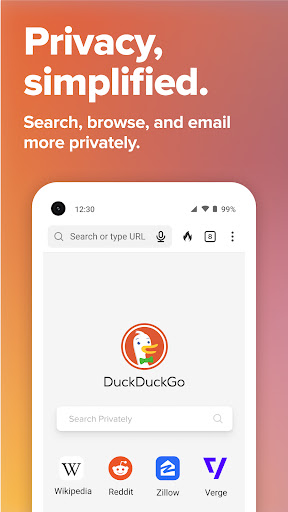
The DuckDuckGo app provides the most comprehensive online privacy protection with the push of a button. With one free download, you get an everyday private Internet browser that offers seamless protection while you search and browse, and access to tracking protection for emails you receive and apps you use. Many of these protections are not offered in most popular web browsers by default.
FEATURE HIGHLIGHTS
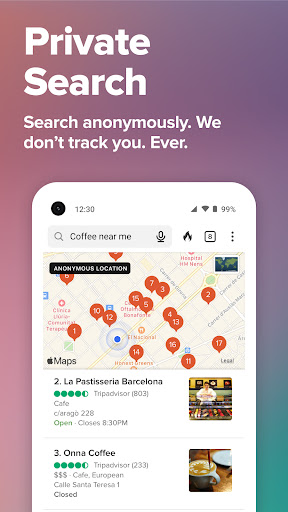
Search Privately by Default – DuckDuckGo Private Search comes built-in, so you can easily search the web without being tracked.
Block Tracking Cookies While Browsing – Prevent most 3rd-party Internet cookies from tracking you as you browse online.
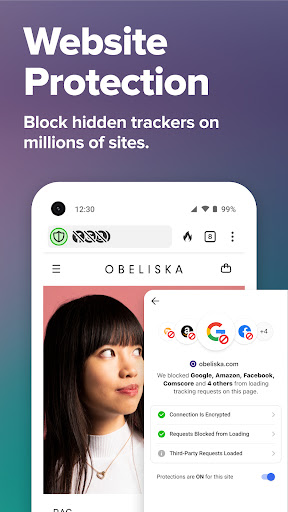
Escape Website Trackers Before They Load – Automatically stop most hidden trackers (3rd-party scripts) from loading, which prevents companies from collecting and using any personal data from these trackers. Stay secure with our cutting-edge tracker-blocking technology – 3rd-Party Tracker Loading Protection, which goes above and beyond what you get in most popular web browsers by default.
Automatically Enforce Encryption – Force many sites you visit to automatically use an encrypted (HTTPS) connection, which helps shield your data from Wi-Fi snoopers and network onlookers like your Internet provider.
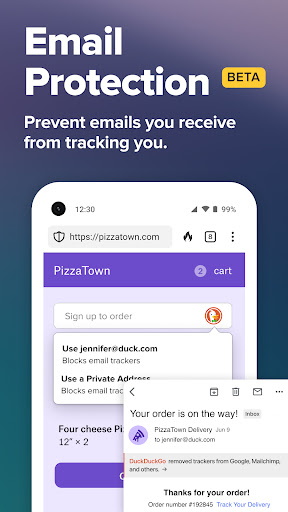
Block Email Trackers (Beta) – Over 85% of emails sent to Duck Addresses (@duck.com) contain trackers that can detect when you’ve opened a message, where you were when you opened it, and what device you were using. Email Protection makes it easy to block most email trackers and hide your existing address when signing up for things online, all without switching email providers.
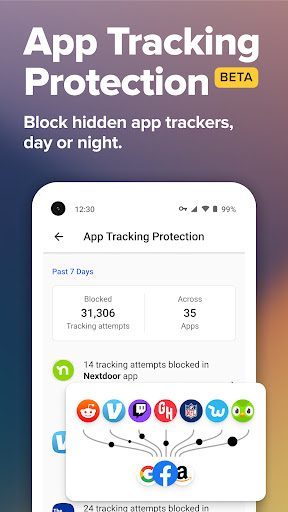
Protect Your Privacy in Other Apps (Beta) – Block most hidden app trackers in other apps day or night, and prevent third-party companies from invading your privacy with App Tracking Protection. This feature uses a VPN connection, but is not a VPN. It works locally on your device and does not collect personal data.
Escape Fingerprinting – Help stop companies from creating a unique identifier for you by blocking their attempts to combine specific information about your web browser and device settings.
Block Tracking Cookies – Prevent most third-party cookies from tracking you as you browse online from website to website.
We feature many protections not available on most Internet browsers (even incognito browsers), including protection from link tracking, Google AMP tracking, and more.
EVERYDAY PRIVACY CONTROLS
Tap Fire Button, Burn Data – Clear your tabs and browsing data fast with our Fire Button.
Signal Your Privacy Preference with Global Privacy Control (GPC) – Built in to our app, GPC intends to help you express your opt-out rights automatically by telling websites not to sell or share your personal information. Whether it can be used to enforce your legal rights (for example, current or future CCPA, GDPR requirements) depends on the laws in your jurisdiction.
Note about our 3rd-Party Tracker Loading Protection following DuckDuckGo ad clicks: Our 3rd-Party Tracker Protection goes above and beyond what you get in most popular browsers by default, but we’re constantly working to make it more comprehensive. Currently, if an advertiser wants to detect conversions on their own website for our private DuckDuckGo search ads, our 3rd-Party Tracker Loading Protection will not stop bat.bing.com requests from loading on the advertiser’s website following DuckDuckGo ad clicks, but those requests are stopped in all other contexts. This is because DuckDuckGo private search advertising is in partnership with Microsoft. As part of that partnership, viewing ads on DuckDuckGo is anonymous and Microsoft has committed to not profile our users’ ad clicks.
Read more about this and our free Tracking Protections at https://help.duckduckgo.com/privacy/web-tracking-protections
Introduction
DuckDuckGo Private Browser is a privacy-focused web browser developed by DuckDuckGo, a company known for its search engine that emphasizes user privacy. The browser aims to provide users with a secure and anonymous browsing experience by blocking trackers, preventing fingerprinting, and encrypting all traffic.
Privacy Features
* Tracker Blocking: DuckDuckGo Private Browser automatically blocks third-party trackers that collect user data for advertising and tracking purposes. This helps protect user privacy and prevents companies from building detailed profiles of their online activities.
* Fingerprinting Prevention: Fingerprinting is a technique used to identify individual users based on their browser settings and hardware characteristics. DuckDuckGo Private Browser employs anti-fingerprinting measures to make it more difficult for websites to track users across different sessions and devices.
* Encrypted Traffic: All traffic through DuckDuckGo Private Browser is encrypted using HTTPS, ensuring that data transmitted between the browser and websites remains secure and protected from eavesdropping.
* Private Search: The browser integrates with DuckDuckGo's search engine, which does not track user searches or store any personal information. This provides users with a truly private search experience.
Additional Features
* Tab Grouping: DuckDuckGo Private Browser allows users to group tabs together for better organization and efficiency. This feature is particularly useful for managing multiple browsing sessions or research projects.
* Dark Mode: The browser supports a dark mode that reduces eye strain and improves visibility in low-light conditions.
* Extension Support: DuckDuckGo Private Browser supports a limited number of privacy-focused extensions that enhance its functionality. These extensions include password managers, ad blockers, and VPNs.
Limitations
* Limited Extension Support: Compared to other popular browsers, DuckDuckGo Private Browser has a limited selection of supported extensions. This may restrict the functionality and customization options for some users.
* Cross-Platform Availability: The browser is currently only available for iOS and Android devices. It is not yet available for desktop platforms such as Windows, macOS, or Linux.
Conclusion
DuckDuckGo Private Browser is a solid choice for users who prioritize privacy and anonymity while browsing the web. Its comprehensive privacy features, including tracker blocking, fingerprinting prevention, and encrypted traffic, effectively protect user data from being collected and tracked. While it has some limitations in terms of extension support and cross-platform availability, DuckDuckGo Private Browser remains a valuable option for those seeking a secure and private browsing experience.
The DuckDuckGo app provides the most comprehensive online privacy protection with the push of a button. With one free download, you get an everyday private Internet browser that offers seamless protection while you search and browse, and access to tracking protection for emails you receive and apps you use. Many of these protections are not offered in most popular web browsers by default.
FEATURE HIGHLIGHTS
Search Privately by Default – DuckDuckGo Private Search comes built-in, so you can easily search the web without being tracked.
Block Tracking Cookies While Browsing – Prevent most 3rd-party Internet cookies from tracking you as you browse online.
Escape Website Trackers Before They Load – Automatically stop most hidden trackers (3rd-party scripts) from loading, which prevents companies from collecting and using any personal data from these trackers. Stay secure with our cutting-edge tracker-blocking technology – 3rd-Party Tracker Loading Protection, which goes above and beyond what you get in most popular web browsers by default.
Automatically Enforce Encryption – Force many sites you visit to automatically use an encrypted (HTTPS) connection, which helps shield your data from Wi-Fi snoopers and network onlookers like your Internet provider.
Block Email Trackers (Beta) – Over 85% of emails sent to Duck Addresses (@duck.com) contain trackers that can detect when you’ve opened a message, where you were when you opened it, and what device you were using. Email Protection makes it easy to block most email trackers and hide your existing address when signing up for things online, all without switching email providers.
Protect Your Privacy in Other Apps (Beta) – Block most hidden app trackers in other apps day or night, and prevent third-party companies from invading your privacy with App Tracking Protection. This feature uses a VPN connection, but is not a VPN. It works locally on your device and does not collect personal data.
Escape Fingerprinting – Help stop companies from creating a unique identifier for you by blocking their attempts to combine specific information about your web browser and device settings.
Block Tracking Cookies – Prevent most third-party cookies from tracking you as you browse online from website to website.
We feature many protections not available on most Internet browsers (even incognito browsers), including protection from link tracking, Google AMP tracking, and more.
EVERYDAY PRIVACY CONTROLS
Tap Fire Button, Burn Data – Clear your tabs and browsing data fast with our Fire Button.
Signal Your Privacy Preference with Global Privacy Control (GPC) – Built in to our app, GPC intends to help you express your opt-out rights automatically by telling websites not to sell or share your personal information. Whether it can be used to enforce your legal rights (for example, current or future CCPA, GDPR requirements) depends on the laws in your jurisdiction.
Note about our 3rd-Party Tracker Loading Protection following DuckDuckGo ad clicks: Our 3rd-Party Tracker Protection goes above and beyond what you get in most popular browsers by default, but we’re constantly working to make it more comprehensive. Currently, if an advertiser wants to detect conversions on their own website for our private DuckDuckGo search ads, our 3rd-Party Tracker Loading Protection will not stop bat.bing.com requests from loading on the advertiser’s website following DuckDuckGo ad clicks, but those requests are stopped in all other contexts. This is because DuckDuckGo private search advertising is in partnership with Microsoft. As part of that partnership, viewing ads on DuckDuckGo is anonymous and Microsoft has committed to not profile our users’ ad clicks.
Read more about this and our free Tracking Protections at https://help.duckduckgo.com/privacy/web-tracking-protections
Introduction
DuckDuckGo Private Browser is a privacy-focused web browser developed by DuckDuckGo, a company known for its search engine that emphasizes user privacy. The browser aims to provide users with a secure and anonymous browsing experience by blocking trackers, preventing fingerprinting, and encrypting all traffic.
Privacy Features
* Tracker Blocking: DuckDuckGo Private Browser automatically blocks third-party trackers that collect user data for advertising and tracking purposes. This helps protect user privacy and prevents companies from building detailed profiles of their online activities.
* Fingerprinting Prevention: Fingerprinting is a technique used to identify individual users based on their browser settings and hardware characteristics. DuckDuckGo Private Browser employs anti-fingerprinting measures to make it more difficult for websites to track users across different sessions and devices.
* Encrypted Traffic: All traffic through DuckDuckGo Private Browser is encrypted using HTTPS, ensuring that data transmitted between the browser and websites remains secure and protected from eavesdropping.
* Private Search: The browser integrates with DuckDuckGo's search engine, which does not track user searches or store any personal information. This provides users with a truly private search experience.
Additional Features
* Tab Grouping: DuckDuckGo Private Browser allows users to group tabs together for better organization and efficiency. This feature is particularly useful for managing multiple browsing sessions or research projects.
* Dark Mode: The browser supports a dark mode that reduces eye strain and improves visibility in low-light conditions.
* Extension Support: DuckDuckGo Private Browser supports a limited number of privacy-focused extensions that enhance its functionality. These extensions include password managers, ad blockers, and VPNs.
Limitations
* Limited Extension Support: Compared to other popular browsers, DuckDuckGo Private Browser has a limited selection of supported extensions. This may restrict the functionality and customization options for some users.
* Cross-Platform Availability: The browser is currently only available for iOS and Android devices. It is not yet available for desktop platforms such as Windows, macOS, or Linux.
Conclusion
DuckDuckGo Private Browser is a solid choice for users who prioritize privacy and anonymity while browsing the web. Its comprehensive privacy features, including tracker blocking, fingerprinting prevention, and encrypted traffic, effectively protect user data from being collected and tracked. While it has some limitations in terms of extension support and cross-platform availability, DuckDuckGo Private Browser remains a valuable option for those seeking a secure and private browsing experience.





