




Explore your eBook Library. Read eBooks with Your Style.
Note: This app works with non-DRM ePub books.
eLibrary Manager is an Android app that allows you to manage and enjoy ePub books on your Android devices. With books loaded on an SD card, you can use the app to
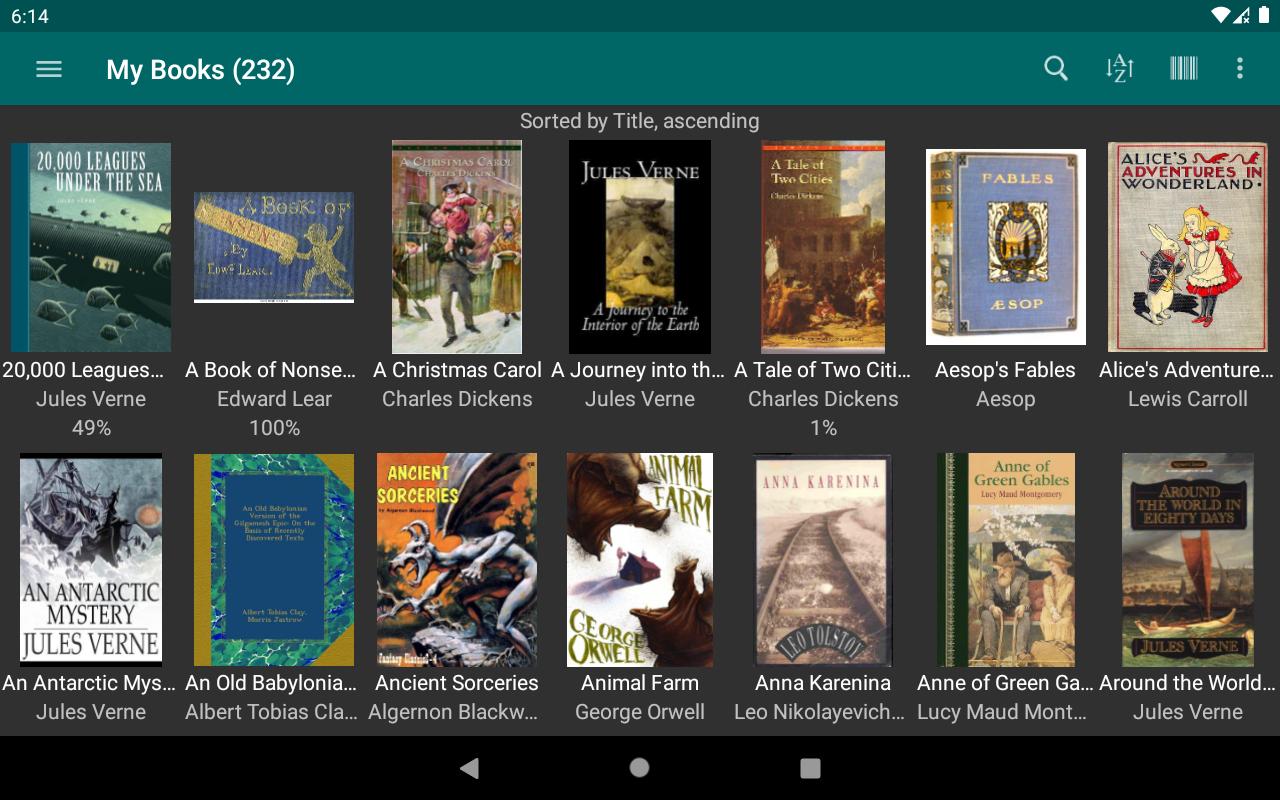
1) Discover eBooks on the SD card and load them into your eLibrary.
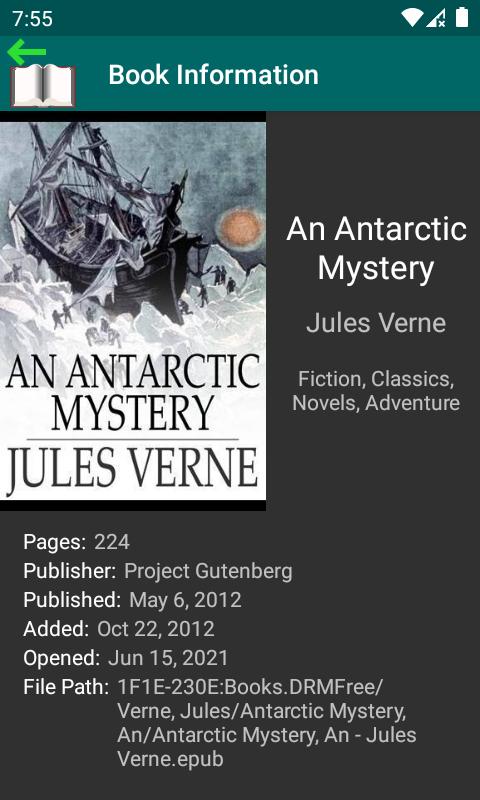
2) Explore the eLibrary using the metadata included in your eBooks.
3) Customize which book metadata properties you want to use for viewing book info, performing searches, and sorting.
4) Find books in your eLibrary using ad-hoc searches or by invoking saved Book List searches.
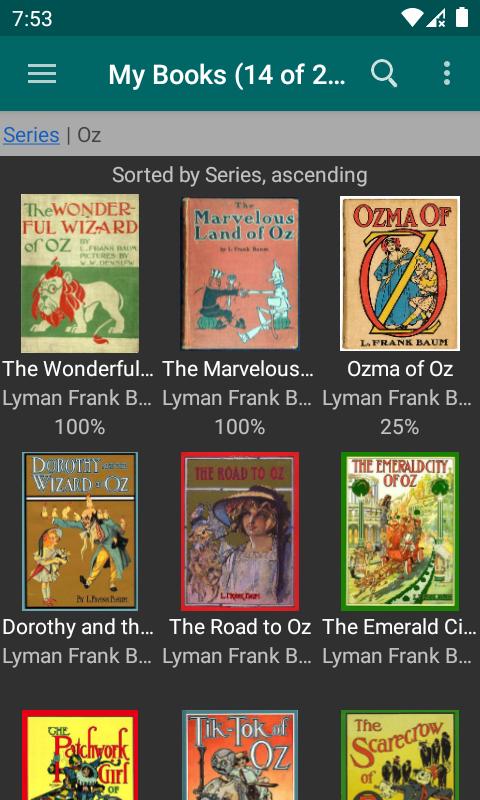
5) View book lists with various layout, grouping, and sorting options to help keep the information organized.
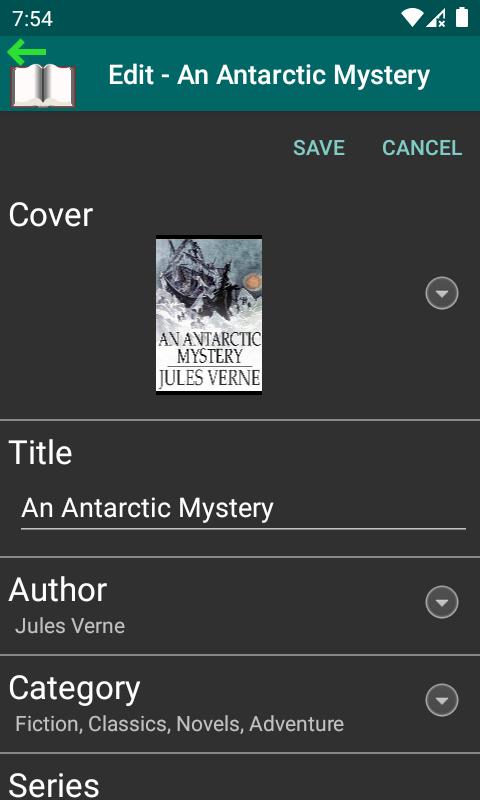
6) Manage eBook info with update ability for virtually any metadata property available for your eBooks, including Categories (synonymous with tags, book shelves, subjects), Series and Series Index, Ratings (up to 5 stars), Title, Authors, Description, and many more...
7) Update book covers from images on your device storage.
8) Export updated book info.
9) Designed to work with calibre, suporting both standard and custom calibre properties.
10) Manage and read remote books through the calibre Content Server. NOTE: This feature requires use of Calbre Documents Provider app.
The ePub Reader is a feature of the eLibrary Manager app that allows you to read ePub books. Some of the features you can enjoy are
1) Use on-screen buttons or swipe gestures to change screen pages one at a time or continuously for fast screen flips.
2) Use pinch in and out gestures to easily change font sizes.
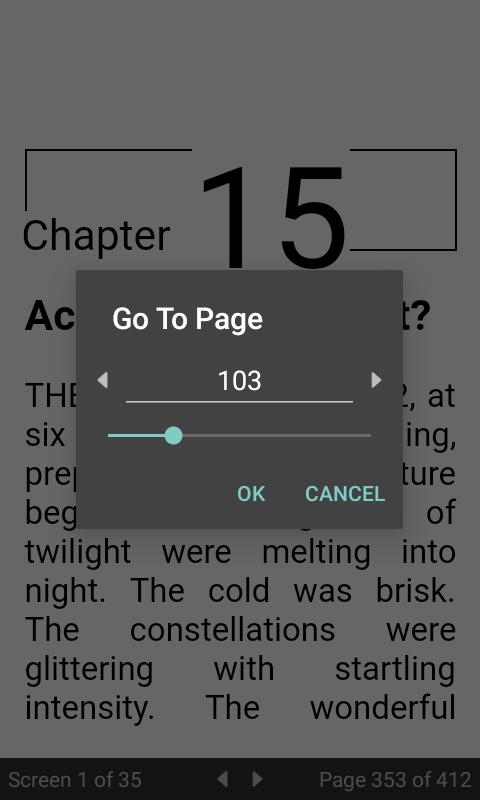
3) Keep track of the current and total screen numbers for the chapter you are reading, as well as the current and total page numbers for the whole book.
4) Goto any screen in the chapter or any page in the book.
5) Add your favourite fonts.
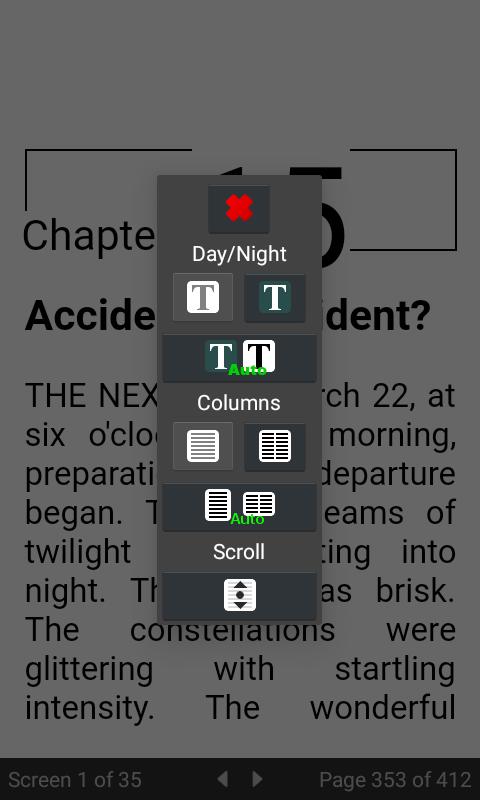
6) Read books in single or multiple columns.
7) Search for text anywhere in the book you are reading.
8) Navigate through the history of book positions when you need to explore.
9) Pick up where you left off when you finish reading and start up again.
10) Customize the visual presentation of books by setting margins, line height, justification, font, and font size.
11) Access the multi-level Table of Contents for the book you are reading.
12) View a summary of the book you are reading.
13) Perform dictionary lookups using configurable dictionaries.
14) Let your Android device read eBooks to you.
15) Export updated book info.
Upgrade to the full version to enjoy the following benefits:
2)[Full] Export ePub books with merged book info updates included, along with external book info files (OPF/cover image).
3)[Full] Manage non-ePub books. NOTE: Requires external reader apps.
4)[Full] Launch external reader apps.
5)[Full] Use the Book Info Browser to explore your library by browsing book info like authors, categories, series, book lists and more.
6)[Full] Integrate with Book Info Lookup Add-on app (available as a separate free download) to browse provider records for alternate covers and book info.
7)[Full] Export updated book info to calibre. NOTE: This feature requires use of Calbre Documents Provider app.
8)[Full] Create and manage custom eBook info properties.
9)[Full] Create and manage bookmarks, notes and highlights.
10)[Full] Export bookmarks, notes and highlights.
11)[Full] Synchronize book positions between devices.
Visit https://kpwsite.com/?itemSelectionPath=library for more information.
eLibrary Manager Basic: Comprehensive SummaryeLibrary Manager Basic is a comprehensive library management software designed to streamline library operations and enhance patron experiences. This versatile solution caters to libraries of all sizes, providing a robust suite of features to efficiently manage collections, facilitate circulation, and deliver exceptional services.
Cataloging and Collection Management:
eLibrary Manager Basic enables libraries to effortlessly catalog and organize their collections, including books, periodicals, audio-visual materials, and digital resources. The intuitive interface allows for the creation of detailed bibliographic records, complete with customizable fields and multiple item locations. The system also supports batch processing for efficient import and export of large datasets.
Circulation Management:
The circulation module empowers libraries to track and manage the lending and return of materials seamlessly. Patrons can quickly check out items using self-service kiosks or via the online catalog. The system automates due date notifications, overdue notices, and fine calculations, ensuring timely return of borrowed items.
Patron Management:
eLibrary Manager Basic facilitates effective patron management, enabling libraries to maintain detailed patron records, including contact information, preferences, and borrowing history. The system supports barcode scanning for quick patron identification, allowing for personalized interactions and tailored services.
Online Public Access Catalog (OPAC):
The integrated OPAC provides patrons with real-time access to the library's catalog from any internet-connected device. Patrons can search for materials by title, author, subject, or keyword, and easily place holds or renew items online. The OPAC also offers customizable options to enhance the user experience, such as recommended reading lists and personalized search filters.
Reporting and Analytics:
eLibrary Manager Basic generates comprehensive reports and analytics to provide libraries with valuable insights into their operations. The system tracks key performance indicators such as circulation statistics, patron usage, and collection growth. These reports empower libraries to make informed decisions and identify areas for improvement.
Additional Features:
Beyond its core functionalities, eLibrary Manager Basic offers a range of additional features to enhance library services:
* Interlibrary Loan: Facilitates the borrowing and lending of materials between libraries.
* Resource Sharing: Enables collaboration with other libraries to expand access to collections.
* Community Engagement: Supports the creation of library events, programs, and online discussion forums.
* Mobile Access: Provides a mobile-friendly version of the OPAC for convenient access on smartphones and tablets.
* Technical Support: Offers dedicated technical support to ensure smooth implementation and ongoing assistance.
Conclusion:
eLibrary Manager Basic is a feature-rich and user-friendly library management software that empowers libraries to optimize their operations, enhance patron experiences, and fulfill their mission of providing access to knowledge and information. Its comprehensive suite of tools, coupled with its intuitive interface and customizable options, makes it an ideal solution for libraries seeking to streamline their processes and deliver exceptional services.
Explore your eBook Library. Read eBooks with Your Style.
Note: This app works with non-DRM ePub books.
eLibrary Manager is an Android app that allows you to manage and enjoy ePub books on your Android devices. With books loaded on an SD card, you can use the app to
1) Discover eBooks on the SD card and load them into your eLibrary.
2) Explore the eLibrary using the metadata included in your eBooks.
3) Customize which book metadata properties you want to use for viewing book info, performing searches, and sorting.
4) Find books in your eLibrary using ad-hoc searches or by invoking saved Book List searches.
5) View book lists with various layout, grouping, and sorting options to help keep the information organized.
6) Manage eBook info with update ability for virtually any metadata property available for your eBooks, including Categories (synonymous with tags, book shelves, subjects), Series and Series Index, Ratings (up to 5 stars), Title, Authors, Description, and many more...
7) Update book covers from images on your device storage.
8) Export updated book info.
9) Designed to work with calibre, suporting both standard and custom calibre properties.
10) Manage and read remote books through the calibre Content Server. NOTE: This feature requires use of Calbre Documents Provider app.
The ePub Reader is a feature of the eLibrary Manager app that allows you to read ePub books. Some of the features you can enjoy are
1) Use on-screen buttons or swipe gestures to change screen pages one at a time or continuously for fast screen flips.
2) Use pinch in and out gestures to easily change font sizes.
3) Keep track of the current and total screen numbers for the chapter you are reading, as well as the current and total page numbers for the whole book.
4) Goto any screen in the chapter or any page in the book.
5) Add your favourite fonts.
6) Read books in single or multiple columns.
7) Search for text anywhere in the book you are reading.
8) Navigate through the history of book positions when you need to explore.
9) Pick up where you left off when you finish reading and start up again.
10) Customize the visual presentation of books by setting margins, line height, justification, font, and font size.
11) Access the multi-level Table of Contents for the book you are reading.
12) View a summary of the book you are reading.
13) Perform dictionary lookups using configurable dictionaries.
14) Let your Android device read eBooks to you.
15) Export updated book info.
Upgrade to the full version to enjoy the following benefits:
2)[Full] Export ePub books with merged book info updates included, along with external book info files (OPF/cover image).
3)[Full] Manage non-ePub books. NOTE: Requires external reader apps.
4)[Full] Launch external reader apps.
5)[Full] Use the Book Info Browser to explore your library by browsing book info like authors, categories, series, book lists and more.
6)[Full] Integrate with Book Info Lookup Add-on app (available as a separate free download) to browse provider records for alternate covers and book info.
7)[Full] Export updated book info to calibre. NOTE: This feature requires use of Calbre Documents Provider app.
8)[Full] Create and manage custom eBook info properties.
9)[Full] Create and manage bookmarks, notes and highlights.
10)[Full] Export bookmarks, notes and highlights.
11)[Full] Synchronize book positions between devices.
Visit https://kpwsite.com/?itemSelectionPath=library for more information.
eLibrary Manager Basic: Comprehensive SummaryeLibrary Manager Basic is a comprehensive library management software designed to streamline library operations and enhance patron experiences. This versatile solution caters to libraries of all sizes, providing a robust suite of features to efficiently manage collections, facilitate circulation, and deliver exceptional services.
Cataloging and Collection Management:
eLibrary Manager Basic enables libraries to effortlessly catalog and organize their collections, including books, periodicals, audio-visual materials, and digital resources. The intuitive interface allows for the creation of detailed bibliographic records, complete with customizable fields and multiple item locations. The system also supports batch processing for efficient import and export of large datasets.
Circulation Management:
The circulation module empowers libraries to track and manage the lending and return of materials seamlessly. Patrons can quickly check out items using self-service kiosks or via the online catalog. The system automates due date notifications, overdue notices, and fine calculations, ensuring timely return of borrowed items.
Patron Management:
eLibrary Manager Basic facilitates effective patron management, enabling libraries to maintain detailed patron records, including contact information, preferences, and borrowing history. The system supports barcode scanning for quick patron identification, allowing for personalized interactions and tailored services.
Online Public Access Catalog (OPAC):
The integrated OPAC provides patrons with real-time access to the library's catalog from any internet-connected device. Patrons can search for materials by title, author, subject, or keyword, and easily place holds or renew items online. The OPAC also offers customizable options to enhance the user experience, such as recommended reading lists and personalized search filters.
Reporting and Analytics:
eLibrary Manager Basic generates comprehensive reports and analytics to provide libraries with valuable insights into their operations. The system tracks key performance indicators such as circulation statistics, patron usage, and collection growth. These reports empower libraries to make informed decisions and identify areas for improvement.
Additional Features:
Beyond its core functionalities, eLibrary Manager Basic offers a range of additional features to enhance library services:
* Interlibrary Loan: Facilitates the borrowing and lending of materials between libraries.
* Resource Sharing: Enables collaboration with other libraries to expand access to collections.
* Community Engagement: Supports the creation of library events, programs, and online discussion forums.
* Mobile Access: Provides a mobile-friendly version of the OPAC for convenient access on smartphones and tablets.
* Technical Support: Offers dedicated technical support to ensure smooth implementation and ongoing assistance.
Conclusion:
eLibrary Manager Basic is a feature-rich and user-friendly library management software that empowers libraries to optimize their operations, enhance patron experiences, and fulfill their mission of providing access to knowledge and information. Its comprehensive suite of tools, coupled with its intuitive interface and customizable options, makes it an ideal solution for libraries seeking to streamline their processes and deliver exceptional services.





