


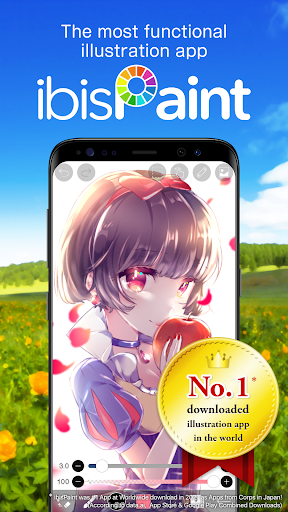
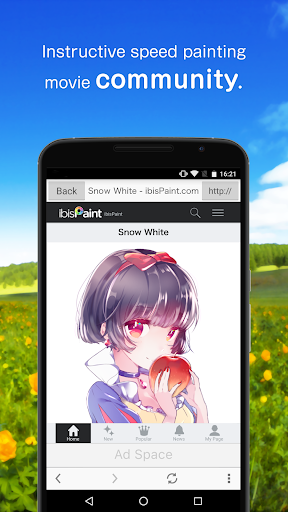
ibis Paint X is a popular and versatile drawing app downloaded more than 370 million times in total as a series, which provides over 15000 brushes, over 21000 materials, over 2100 fonts, 84 filters, 46 screentones, 27 blending modes, recording drawing processes, stroke stabilization feature, various ruler features such as radial line rulers or symmetry rulers, and clipping mask features.
*YouTube channel
Many tutorial videos on ibis Paint are uploaded to our YouTube channel.
Subscribe it!
https://youtube.com/ibisPaint
*Concept/Features
- A Highly functional and professional features surpassing that of desktop drawing apps.
- Smooth and comfortable drawing experience realized by OpenGL technology.
- Recording your drawing process as a video.
- SNS feature where you can learn drawing techniques from other users' drawing process videos.
*Features
ibis Paint has high functionality as a drawing app along with features of sharing drawing processes with other users.
[Brush Features]
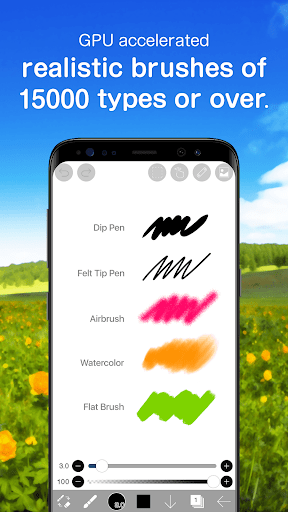
- Smooth drawing at up to 60 fps.
- Over 15000 kinds of brushes including dip pens, felt tip pens, digital pens, air brushes, fan brushes, flat brushes, pencils, oil brushes, charcoal brushes, crayons and stamps.
- Various brush parameters such as starting/ending thickness, starting/ending opacity, and initial/final brush angle.
- Quick sliders that allow you to quickly adjust brush thickness and opacity.
- Real time brush previews.
[Layer Features]
- You can add layers as many as you need with no limit.
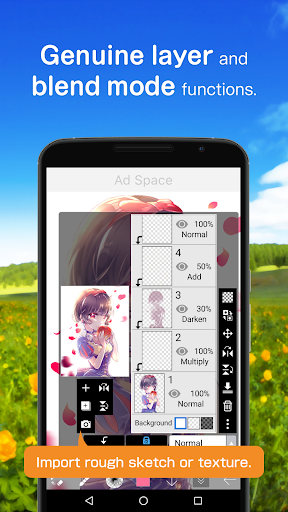
- Layer parameters that can be set to each layers individually such as layer opacity, alpha blending, adding, subtracting, and multiplying.
- A handy clipping feature for clipping images, etc.
- Various layer commands such as layer duplication, import from the photo library, horizontal inversion, vertical inversion, layer rotation, layer moving, and zooming in/out.
- A feature for setting layer names to distinguish different layers.
*About ibis Paint purchase plan
The following purchase plans are available for ibis Paint:
- ibis Paint X (free version)
- ibis Paint (paid version)
- Remove Ads Add-on
- Prime Membership (Monthly plan / Yearly plan)
There is no difference in features other than the presence or absence of advertisements for the paid version and the free version.
If you purchase the Remove Ads Add-on, the ads will not be displayed and there will be no difference from the paid version of ibis Paint.
In order to use more advanced functions, the following Prime Membership (Monthly plan / Yearly plan) contracts are required.
[Prime Membership]
A prime member can use the prime features. You can try it free for the 30 days at the time of the first purchase. A prime member can use the following features and services
- 20GB of cloud storage capacity
- Prime Materials
- Prime Canvas Papers
- Prime Fonts
- Tone Curve filter
- Gradation Map filter
- Levels Adjustment filter
- Replace Color filter
- Clouds filter
- Reordering artworks in My Gallery
- No advertisements displayed
* After you become a prime member with the 30 days free trial, if you do not cancel your “Prime Membership” at least 24 hours before the last day of the free trial, your “Prime Membership” will be automatically renewed and you will be charged for the automatic renewal.
* We will add premium features in future, please look out for them.
*On Data Collection
- Only when you are using or going to use SonarPen, the app collects audio signal from microphone. The collected data is only used for communication with SonarPen, and is never saved nor sent to anywhere.
*Questions and support
Questions and bug reports in reviews will not be responded to, so please contact ibis Paint support.
https://ssl.ibis.ne.jp/en/support/Entry?svid=25
*ibisPaint's terms of service
https://ibispaint.com/agreement.jsp
ibis Paint X is a versatile and feature-rich art application designed for mobile devices. It empowers artists of all skill levels to create stunning digital artwork with ease and precision.
Intuitive Interface and User-Friendly Design
ibis Paint X boasts an intuitive interface that streamlines the creative process. The well-organized toolbars and customizable workspace provide quick access to essential features, allowing artists to focus on their creations without distractions.
Extensive Brush Library and Customization Options
The app offers a vast library of over 380 brushes, each with customizable settings for size, shape, and texture. Artists can create custom brushes to suit their unique styles and techniques.
Layer System and Blending Modes
ibis Paint X employs a layer-based system that enables artists to isolate and manipulate different elements of their artwork. Multiple blending modes allow for seamless integration and sophisticated effects.
Advanced Drawing Tools and Features
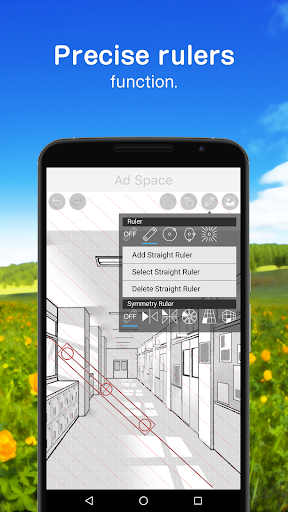
The app provides advanced drawing tools such as perspective rulers, symmetry rulers, and clipping masks. These features facilitate precise and efficient drawing, allowing artists to create complex compositions with ease.
Unlimited Canvas Size and High Resolution
ibis Paint X supports unlimited canvas sizes, empowering artists to work on large-scale projects without limitations. High-resolution output ensures sharp and detailed images, suitable for printing or digital display.
Time-Lapse Recording and Social Sharing
Artists can record their creative process as time-lapse videos, providing valuable insights into their techniques and allowing them to share their progress with others. The app also offers seamless integration with social media platforms for easy sharing.
Cloud Storage and Collaboration
ibis Paint X supports cloud storage, allowing artists to securely backup their artwork and access it from multiple devices. The app also facilitates collaboration, enabling artists to work together on shared projects.
Additional Features
In addition to its core features, ibis Paint X offers a range of supplementary tools and resources, including:
* Text and font support
* Image editing and adjustment capabilities
* Filter and effect library
* Tutorial videos and community support
Conclusion
ibis Paint X is a powerful and versatile art app that caters to the needs of both amateur and professional artists. Its intuitive interface, extensive brush library, advanced drawing tools, and social sharing features make it an indispensable tool for digital art creation on mobile devices.
ibis Paint X is a popular and versatile drawing app downloaded more than 370 million times in total as a series, which provides over 15000 brushes, over 21000 materials, over 2100 fonts, 84 filters, 46 screentones, 27 blending modes, recording drawing processes, stroke stabilization feature, various ruler features such as radial line rulers or symmetry rulers, and clipping mask features.
*YouTube channel
Many tutorial videos on ibis Paint are uploaded to our YouTube channel.
Subscribe it!
https://youtube.com/ibisPaint
*Concept/Features
- A Highly functional and professional features surpassing that of desktop drawing apps.
- Smooth and comfortable drawing experience realized by OpenGL technology.
- Recording your drawing process as a video.
- SNS feature where you can learn drawing techniques from other users' drawing process videos.
*Features
ibis Paint has high functionality as a drawing app along with features of sharing drawing processes with other users.
[Brush Features]
- Smooth drawing at up to 60 fps.
- Over 15000 kinds of brushes including dip pens, felt tip pens, digital pens, air brushes, fan brushes, flat brushes, pencils, oil brushes, charcoal brushes, crayons and stamps.
- Various brush parameters such as starting/ending thickness, starting/ending opacity, and initial/final brush angle.
- Quick sliders that allow you to quickly adjust brush thickness and opacity.
- Real time brush previews.
[Layer Features]
- You can add layers as many as you need with no limit.
- Layer parameters that can be set to each layers individually such as layer opacity, alpha blending, adding, subtracting, and multiplying.
- A handy clipping feature for clipping images, etc.
- Various layer commands such as layer duplication, import from the photo library, horizontal inversion, vertical inversion, layer rotation, layer moving, and zooming in/out.
- A feature for setting layer names to distinguish different layers.
*About ibis Paint purchase plan
The following purchase plans are available for ibis Paint:
- ibis Paint X (free version)
- ibis Paint (paid version)
- Remove Ads Add-on
- Prime Membership (Monthly plan / Yearly plan)
There is no difference in features other than the presence or absence of advertisements for the paid version and the free version.
If you purchase the Remove Ads Add-on, the ads will not be displayed and there will be no difference from the paid version of ibis Paint.
In order to use more advanced functions, the following Prime Membership (Monthly plan / Yearly plan) contracts are required.
[Prime Membership]
A prime member can use the prime features. You can try it free for the 30 days at the time of the first purchase. A prime member can use the following features and services
- 20GB of cloud storage capacity
- Prime Materials
- Prime Canvas Papers
- Prime Fonts
- Tone Curve filter
- Gradation Map filter
- Levels Adjustment filter
- Replace Color filter
- Clouds filter
- Reordering artworks in My Gallery
- No advertisements displayed
* After you become a prime member with the 30 days free trial, if you do not cancel your “Prime Membership” at least 24 hours before the last day of the free trial, your “Prime Membership” will be automatically renewed and you will be charged for the automatic renewal.
* We will add premium features in future, please look out for them.
*On Data Collection
- Only when you are using or going to use SonarPen, the app collects audio signal from microphone. The collected data is only used for communication with SonarPen, and is never saved nor sent to anywhere.
*Questions and support
Questions and bug reports in reviews will not be responded to, so please contact ibis Paint support.
https://ssl.ibis.ne.jp/en/support/Entry?svid=25
*ibisPaint's terms of service
https://ibispaint.com/agreement.jsp
ibis Paint X is a versatile and feature-rich art application designed for mobile devices. It empowers artists of all skill levels to create stunning digital artwork with ease and precision.
Intuitive Interface and User-Friendly Design
ibis Paint X boasts an intuitive interface that streamlines the creative process. The well-organized toolbars and customizable workspace provide quick access to essential features, allowing artists to focus on their creations without distractions.
Extensive Brush Library and Customization Options
The app offers a vast library of over 380 brushes, each with customizable settings for size, shape, and texture. Artists can create custom brushes to suit their unique styles and techniques.
Layer System and Blending Modes
ibis Paint X employs a layer-based system that enables artists to isolate and manipulate different elements of their artwork. Multiple blending modes allow for seamless integration and sophisticated effects.
Advanced Drawing Tools and Features
The app provides advanced drawing tools such as perspective rulers, symmetry rulers, and clipping masks. These features facilitate precise and efficient drawing, allowing artists to create complex compositions with ease.
Unlimited Canvas Size and High Resolution
ibis Paint X supports unlimited canvas sizes, empowering artists to work on large-scale projects without limitations. High-resolution output ensures sharp and detailed images, suitable for printing or digital display.
Time-Lapse Recording and Social Sharing
Artists can record their creative process as time-lapse videos, providing valuable insights into their techniques and allowing them to share their progress with others. The app also offers seamless integration with social media platforms for easy sharing.
Cloud Storage and Collaboration
ibis Paint X supports cloud storage, allowing artists to securely backup their artwork and access it from multiple devices. The app also facilitates collaboration, enabling artists to work together on shared projects.
Additional Features
In addition to its core features, ibis Paint X offers a range of supplementary tools and resources, including:
* Text and font support
* Image editing and adjustment capabilities
* Filter and effect library
* Tutorial videos and community support
Conclusion
ibis Paint X is a powerful and versatile art app that caters to the needs of both amateur and professional artists. Its intuitive interface, extensive brush library, advanced drawing tools, and social sharing features make it an indispensable tool for digital art creation on mobile devices.





