



Watermark Photos & Video With Logo, Text, Signature, Graphic, Copyright Metadata
Watermark App for Professional and Beginning Photographers
🚫 No Ads
🚫 No In App Purchases
Add watermark to a photo or video. A watermark displays that it was created and is owned by you. Watermarking your photos & videos is easy with a watermark or watermarks using your name, logo, copyright, trademark, QR code, signature, etc. Sign your photos with 5 visible and 2 invisible = 7 watermark types. Use one or multiple watermarks simultaneously on one or a batch of photos.
This free app is the way to try before you buy. This free version includes a small watermark that says 'Created with iWatermark'. If you prefer to not have this watermark please upgrade to the inexpensive regular version. Buying the regular version supports our continuing work on this app.
Often when a photo goes viral the owner/creator becomes unknown, is lost or forgotten. Adding a watermark subtly displays, no matter where your photo goes, that it is owned by you. Watermark with your logo, email, website url, signature, QR or other info to maintain a connection to your photos.
iWatermark+, is the only watermarking tool available for all 4 platforms Android, iPhone/iPad, Mac and Windows. iWatermark+ is the most popular and advanced utility for creating watermarks and watermarking photos.
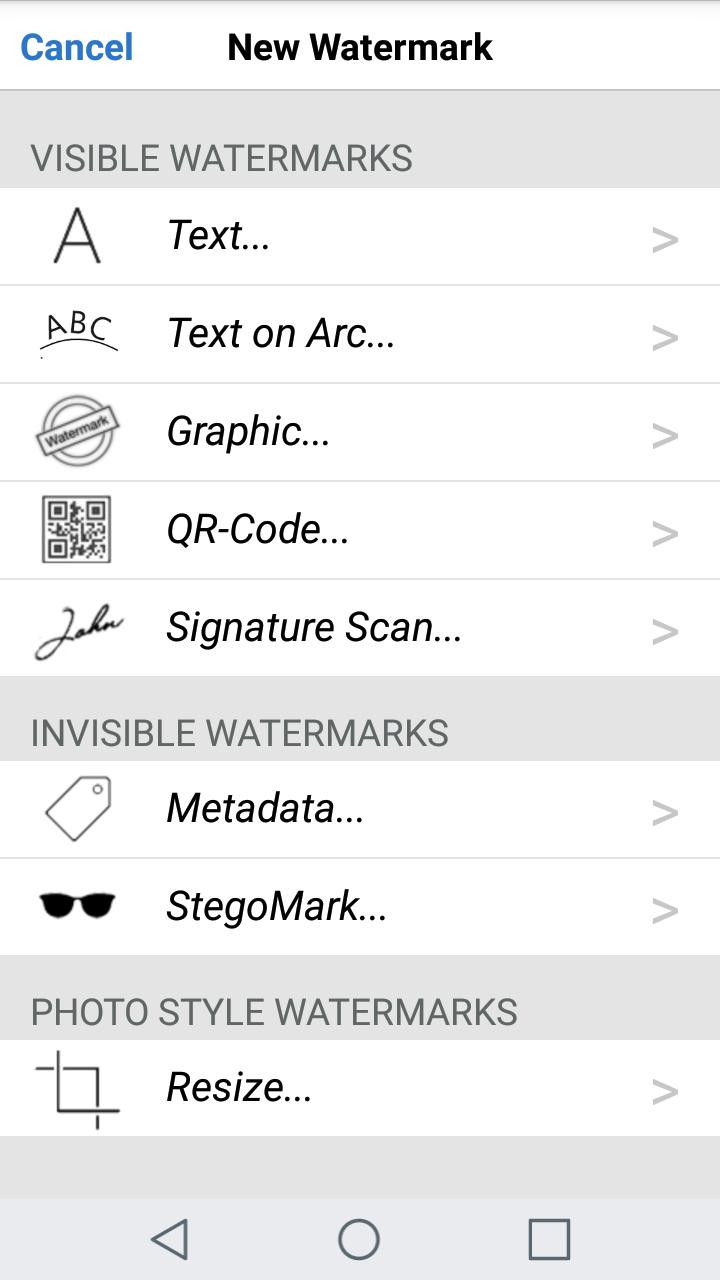
Only iWatermark+ has 7 Watermark Types-
5 Visible Watermarks:
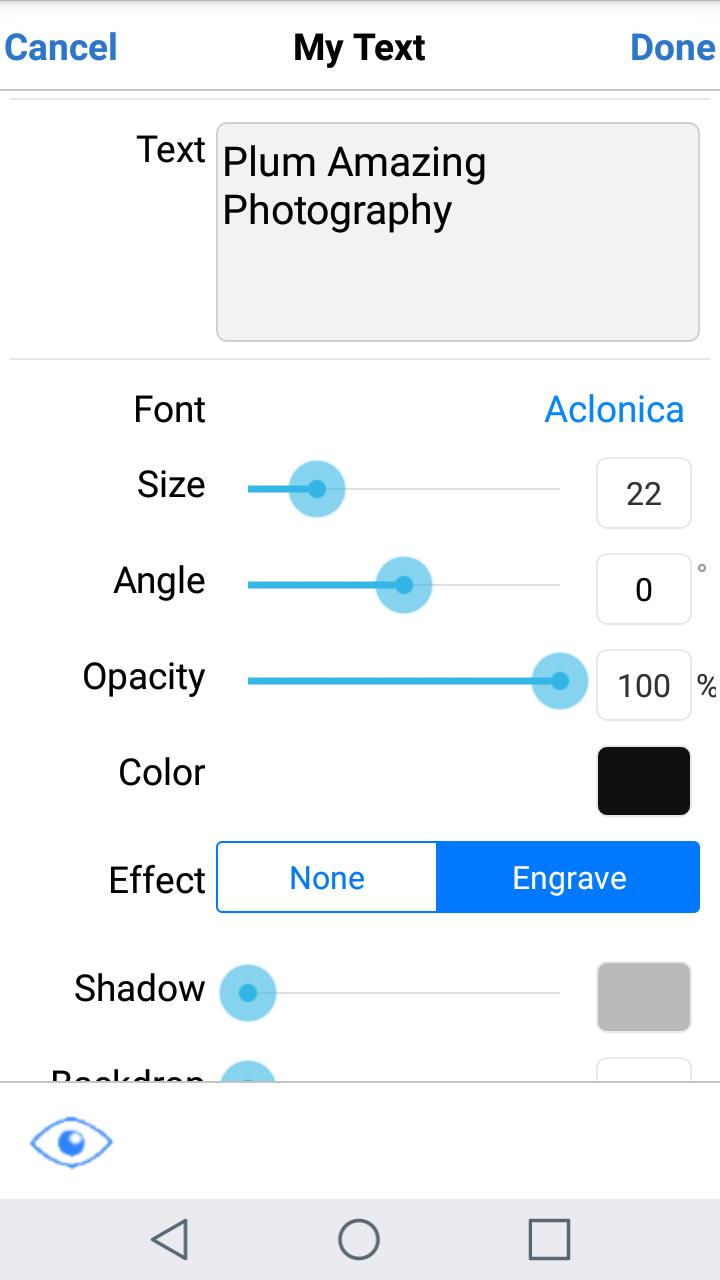
- Text - and change the font, color, angle, opacity, etc
- Arc Text
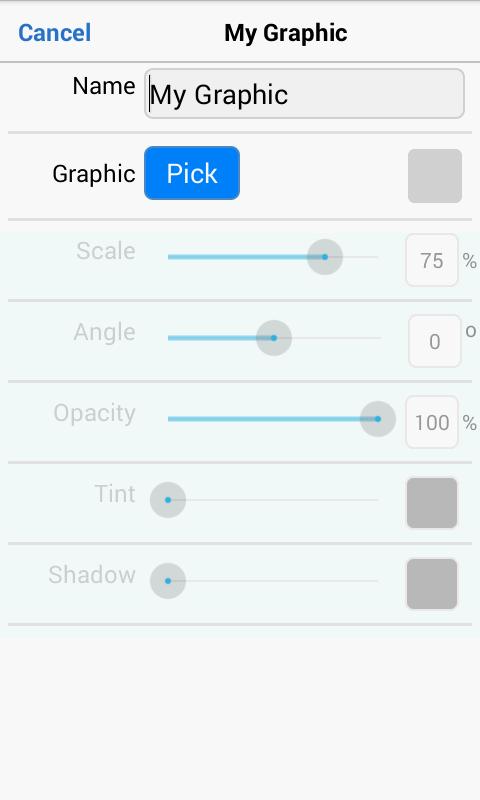
- Bitmap Graphics - import your logo or use our library
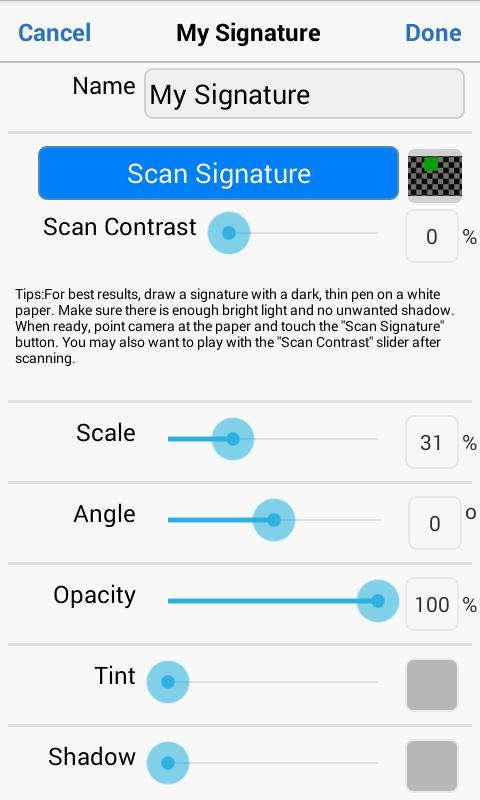
- Signature Scan - creates a watermark of your signature
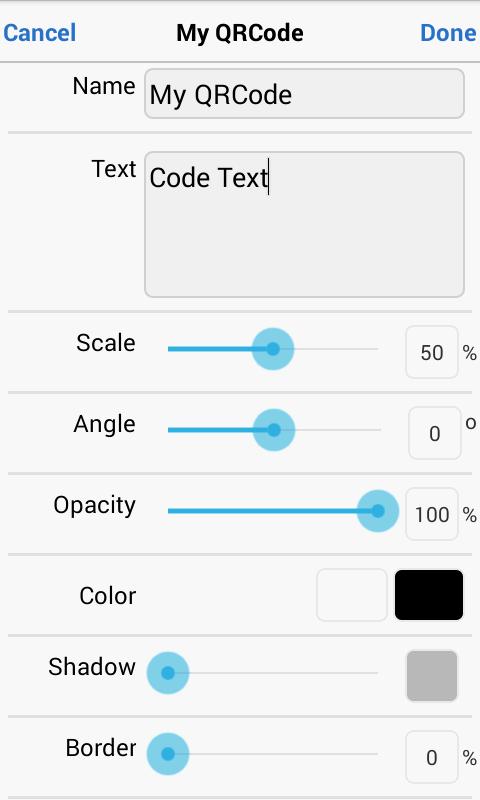
- QRCode - creates a watermark that is like a barcode, readable by any smartphone camera and can contain up to 4000 characters of info
2 Invisible Watermarks:
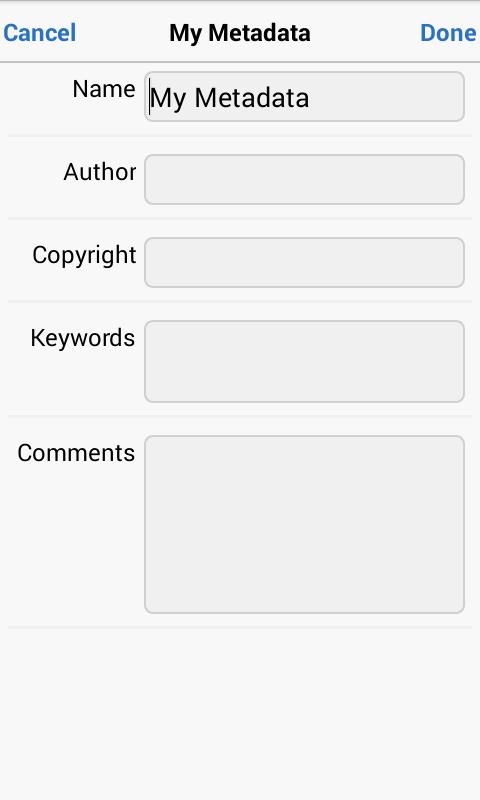
- Metadata - for making watermarks that include IPTC/EXIF tags (like camera info, GPS, copyright, etc.) info
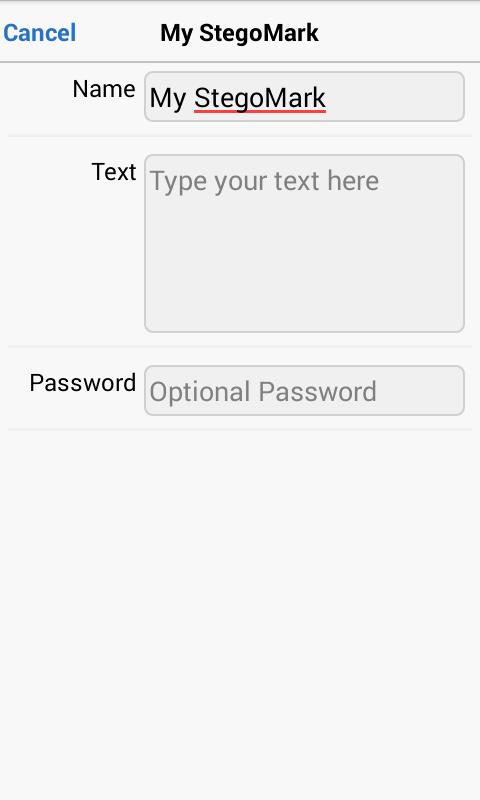
- Steganographic - for hiding a watermark in the color data of a photo
Only iWatermark+ has these features:
* watermark photos and videos too
* creates 7 watermark types, text, text on an arc, bitmap, signature, QR, metadata, and steganographic
* steganographic watermark that embeds info invisibly in the photo
* keeps a database of all your watermarks
* can apply multiple watermarks to one photo
* watermark one or multiple photos in batch mode
* includes 292 excellent fonts but also use any custom font
* engrave and emboss text
* signature scanner to instantly import your signature or graphic as a watermark
* live preview and editing of font, color, scale, opacity, size, position and angle
* view metadata & exif in photos
* create metadata tags in text watermarks
Watermarking displays your ownership of a photo. Like signing your name to a document, watermarking subtly displays, no matter where your photo goes, that it’s your property.
Touch is what iWatermark+ on Android is all about:
♦ Drag the watermark to any position on the page
♦ Create your own text or graphic watermarks or select from the included example watermarks (both text and graphics)
♦ Single or batch process photos
♦ Choose from hundres of fonts
♦ By touch easily adjust the watermarks scale, opacity, font, color and angle and more
Why Watermark?
Digitally sign your photos/artwork with iWatermark+ to claim, secure and maintain your intellectual property and reputation.
✔ Photos go viral then they fly off globally. Watermark with name, email or url so your photo has a visible and legal connection to you
✔ Build your company brand, by having your company watermark on all it's photos
✔ Promote your company, name and website by using QR codes as watermarks
✔ Avoid the surprise of seeing your photos and/or artwork elsewhere on the web or in an ad
✔ Avoid the conflicts, costly litigation and headaches from plagiarists who claim they didn't know that you created it
✔ Avoid intellectual property (IP) squabbles
Localizations: ✔ English ✔ French, ✔ German, ✔ Japanese, ✔ Chinese, ✔ Vietnamese, ✔ Hindi, ✔ Spanish ✔ Urdu ✔ Indonesian
Contact us if you need help or have a suggestion
What's New in the Latest Version 5.2.7
Last updated on Jul 4, 2024
[update]: enhance UI/UX
[update]: enhance the description of watermarks.
Overview:
iWatermark+ Logo Photos & Video is a versatile watermarking software designed to protect and enhance your digital content. With its advanced features and user-friendly interface, it empowers photographers, videographers, and businesses to effectively safeguard their intellectual property.
Key Features:
Logo and Text Watermarks:
iWatermark+ allows you to add customizable logos and text watermarks to your photos and videos. You can choose from a wide range of pre-designed templates or create your own unique designs. The software supports various image formats, including JPEG, PNG, TIFF, and HEIC.
Invisible Watermarks:
Protect your content discreetly with invisible watermarks. These watermarks are embedded within the image data and are not visible to the naked eye. They provide a secure and tamper-proof way to identify ownership and prevent unauthorized use.
Batch Watermarking:
Save time and effort by batch watermarking multiple photos and videos simultaneously. iWatermark+ can process hundreds of files at once, ensuring efficient and consistent protection of your digital assets.
Video Watermarks:
Extend watermarking capabilities to your videos. iWatermark+ offers a range of options for adding logos, text, and invisible watermarks to videos. You can customize the watermark's size, position, and duration to ensure maximum visibility.
Geotagging:
Automatically add geotags to your photos, providing location information that can enhance their authenticity and value. iWatermark+ allows you to embed GPS coordinates directly into the image metadata.
Customization and Control:
iWatermark+ provides extensive customization options to tailor the watermarking process to your specific needs. Adjust the opacity, color, size, and rotation of watermarks to achieve the desired effect. You can also preview the results before applying them to your content.
User Interface:
The intuitive user interface of iWatermark+ makes it easy for both beginners and experienced users to navigate. The software features a drag-and-drop interface, making it simple to add watermarks to your photos and videos.
Security and Privacy:
iWatermark+ prioritizes security and privacy. All watermarks are encrypted to prevent unauthorized access or modification. The software does not store or share your content with third parties, ensuring the confidentiality of your sensitive information.
Conclusion:
iWatermark+ Logo Photos & Video is an indispensable tool for anyone who wants to protect and enhance their digital content. With its advanced features, versatility, and ease of use, it empowers you to safeguard your intellectual property, prevent unauthorized distribution, and promote your brand effectively. Whether you're a professional photographer, videographer, or business owner, iWatermark+ provides the ultimate solution for watermarking your digital assets.
Watermark Photos & Video With Logo, Text, Signature, Graphic, Copyright Metadata
Watermark App for Professional and Beginning Photographers
🚫 No Ads
🚫 No In App Purchases
Add watermark to a photo or video. A watermark displays that it was created and is owned by you. Watermarking your photos & videos is easy with a watermark or watermarks using your name, logo, copyright, trademark, QR code, signature, etc. Sign your photos with 5 visible and 2 invisible = 7 watermark types. Use one or multiple watermarks simultaneously on one or a batch of photos.
This free app is the way to try before you buy. This free version includes a small watermark that says 'Created with iWatermark'. If you prefer to not have this watermark please upgrade to the inexpensive regular version. Buying the regular version supports our continuing work on this app.
Often when a photo goes viral the owner/creator becomes unknown, is lost or forgotten. Adding a watermark subtly displays, no matter where your photo goes, that it is owned by you. Watermark with your logo, email, website url, signature, QR or other info to maintain a connection to your photos.
iWatermark+, is the only watermarking tool available for all 4 platforms Android, iPhone/iPad, Mac and Windows. iWatermark+ is the most popular and advanced utility for creating watermarks and watermarking photos.
Only iWatermark+ has 7 Watermark Types-
5 Visible Watermarks:
- Text - and change the font, color, angle, opacity, etc
- Arc Text
- Bitmap Graphics - import your logo or use our library
- Signature Scan - creates a watermark of your signature
- QRCode - creates a watermark that is like a barcode, readable by any smartphone camera and can contain up to 4000 characters of info
2 Invisible Watermarks:
- Metadata - for making watermarks that include IPTC/EXIF tags (like camera info, GPS, copyright, etc.) info
- Steganographic - for hiding a watermark in the color data of a photo
Only iWatermark+ has these features:
* watermark photos and videos too
* creates 7 watermark types, text, text on an arc, bitmap, signature, QR, metadata, and steganographic
* steganographic watermark that embeds info invisibly in the photo
* keeps a database of all your watermarks
* can apply multiple watermarks to one photo
* watermark one or multiple photos in batch mode
* includes 292 excellent fonts but also use any custom font
* engrave and emboss text
* signature scanner to instantly import your signature or graphic as a watermark
* live preview and editing of font, color, scale, opacity, size, position and angle
* view metadata & exif in photos
* create metadata tags in text watermarks
Watermarking displays your ownership of a photo. Like signing your name to a document, watermarking subtly displays, no matter where your photo goes, that it’s your property.
Touch is what iWatermark+ on Android is all about:
♦ Drag the watermark to any position on the page
♦ Create your own text or graphic watermarks or select from the included example watermarks (both text and graphics)
♦ Single or batch process photos
♦ Choose from hundres of fonts
♦ By touch easily adjust the watermarks scale, opacity, font, color and angle and more
Why Watermark?
Digitally sign your photos/artwork with iWatermark+ to claim, secure and maintain your intellectual property and reputation.
✔ Photos go viral then they fly off globally. Watermark with name, email or url so your photo has a visible and legal connection to you
✔ Build your company brand, by having your company watermark on all it's photos
✔ Promote your company, name and website by using QR codes as watermarks
✔ Avoid the surprise of seeing your photos and/or artwork elsewhere on the web or in an ad
✔ Avoid the conflicts, costly litigation and headaches from plagiarists who claim they didn't know that you created it
✔ Avoid intellectual property (IP) squabbles
Localizations: ✔ English ✔ French, ✔ German, ✔ Japanese, ✔ Chinese, ✔ Vietnamese, ✔ Hindi, ✔ Spanish ✔ Urdu ✔ Indonesian
Contact us if you need help or have a suggestion
What's New in the Latest Version 5.2.7
Last updated on Jul 4, 2024
[update]: enhance UI/UX
[update]: enhance the description of watermarks.
Overview:
iWatermark+ Logo Photos & Video is a versatile watermarking software designed to protect and enhance your digital content. With its advanced features and user-friendly interface, it empowers photographers, videographers, and businesses to effectively safeguard their intellectual property.
Key Features:
Logo and Text Watermarks:
iWatermark+ allows you to add customizable logos and text watermarks to your photos and videos. You can choose from a wide range of pre-designed templates or create your own unique designs. The software supports various image formats, including JPEG, PNG, TIFF, and HEIC.
Invisible Watermarks:
Protect your content discreetly with invisible watermarks. These watermarks are embedded within the image data and are not visible to the naked eye. They provide a secure and tamper-proof way to identify ownership and prevent unauthorized use.
Batch Watermarking:
Save time and effort by batch watermarking multiple photos and videos simultaneously. iWatermark+ can process hundreds of files at once, ensuring efficient and consistent protection of your digital assets.
Video Watermarks:
Extend watermarking capabilities to your videos. iWatermark+ offers a range of options for adding logos, text, and invisible watermarks to videos. You can customize the watermark's size, position, and duration to ensure maximum visibility.
Geotagging:
Automatically add geotags to your photos, providing location information that can enhance their authenticity and value. iWatermark+ allows you to embed GPS coordinates directly into the image metadata.
Customization and Control:
iWatermark+ provides extensive customization options to tailor the watermarking process to your specific needs. Adjust the opacity, color, size, and rotation of watermarks to achieve the desired effect. You can also preview the results before applying them to your content.
User Interface:
The intuitive user interface of iWatermark+ makes it easy for both beginners and experienced users to navigate. The software features a drag-and-drop interface, making it simple to add watermarks to your photos and videos.
Security and Privacy:
iWatermark+ prioritizes security and privacy. All watermarks are encrypted to prevent unauthorized access or modification. The software does not store or share your content with third parties, ensuring the confidentiality of your sensitive information.
Conclusion:
iWatermark+ Logo Photos & Video is an indispensable tool for anyone who wants to protect and enhance their digital content. With its advanced features, versatility, and ease of use, it empowers you to safeguard your intellectual property, prevent unauthorized distribution, and promote your brand effectively. Whether you're a professional photographer, videographer, or business owner, iWatermark+ provides the ultimate solution for watermarking your digital assets.





