


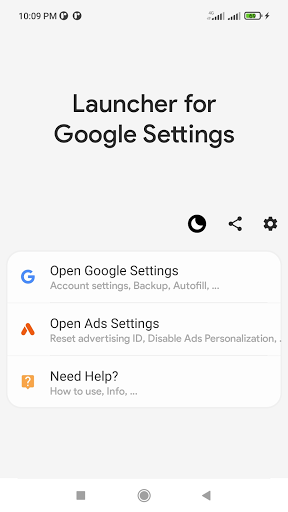
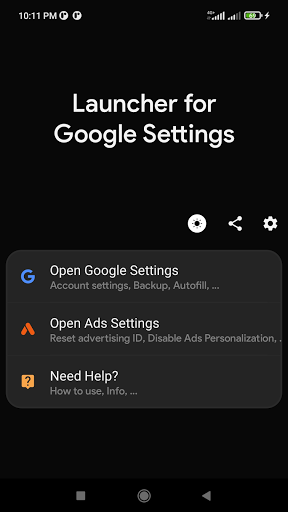
This app is an Activity launcher to open Google Settings app. It is also a shortcut for quick access to Account settings or Ads settings.
These settings can be used for account sign in, sync, show my activity history, ads settings, ad ID reset (advertising identifier), opt out of ads personalization, account restore or recovery, update, remove, password autofill, information.
DETAILS
Many phone models especially china made phones come without account settings.
what this app does is looking for the package name of the setting in play services packages and uses the Activity launcher to open it.
Note that this app needs Play Services to be installed.
FEATURES
► Quick and easy
► Night mode support (Dark mode).
► Modern and pleasant UI (Interface).
► Pleasant and flat icon.
► Without root neither creepy permissions.
SOME SETTINGS
► Config Accounts: create new, sign in, change user, edit, change profile name and picture, log out, disable or remove account, get the security code, recover and restore, secure account, …
► My Activity History: show search history and remove them.
► Ads Settings: show ad ID, reset advertising ID (remove user interest history to reset ad personalization), opt out of ads personalization.
► Sync Account Settings: enable and config sync, recover contacts and data, …
► Password manager: enable password manager, secure passwords, enable autofill.
► Account information.
💬 Do you have an idea, suggestions, or feedback? do you encounter any problems? Contact us via Developer email.
DISCLAIMER
This 3rd party app is not an app from Google and not affiliated with them.
The Application icon (Settings icon) from .Launcher for Google Settings
Launcher for Google Settings is an Android app that provides quick and easy access to Google Settings. It is a lightweight and user-friendly app that can be used to quickly access and change various Google settings, such as account settings, privacy settings, and notification settings.
Features
* Quick and easy access to Google Settings
* Change various Google settings, such as account settings, privacy settings, and notification settings
* Lightweight and user-friendly app
* Free to download and use
How to Use
To use Launcher for Google Settings, simply download and install the app from the Google Play Store. Once installed, open the app and you will be presented with a list of all the available Google settings. You can then tap on any setting to open it and make changes.
Benefits
Launcher for Google Settings offers a number of benefits, including:
* Quick and easy access to Google Settings
* Ability to change various Google settings
* Lightweight and user-friendly app
* Free to download and use
Conclusion
Launcher for Google Settings is a useful and convenient app for Android users who want to quickly and easily access and change Google settings. It is a lightweight and user-friendly app that is free to download and use.
This app is an Activity launcher to open Google Settings app. It is also a shortcut for quick access to Account settings or Ads settings.
These settings can be used for account sign in, sync, show my activity history, ads settings, ad ID reset (advertising identifier), opt out of ads personalization, account restore or recovery, update, remove, password autofill, information.
DETAILS
Many phone models especially china made phones come without account settings.
what this app does is looking for the package name of the setting in play services packages and uses the Activity launcher to open it.
Note that this app needs Play Services to be installed.
FEATURES
► Quick and easy
► Night mode support (Dark mode).
► Modern and pleasant UI (Interface).
► Pleasant and flat icon.
► Without root neither creepy permissions.
SOME SETTINGS
► Config Accounts: create new, sign in, change user, edit, change profile name and picture, log out, disable or remove account, get the security code, recover and restore, secure account, …
► My Activity History: show search history and remove them.
► Ads Settings: show ad ID, reset advertising ID (remove user interest history to reset ad personalization), opt out of ads personalization.
► Sync Account Settings: enable and config sync, recover contacts and data, …
► Password manager: enable password manager, secure passwords, enable autofill.
► Account information.
💬 Do you have an idea, suggestions, or feedback? do you encounter any problems? Contact us via Developer email.
DISCLAIMER
This 3rd party app is not an app from Google and not affiliated with them.
The Application icon (Settings icon) from .Launcher for Google Settings
Launcher for Google Settings is an Android app that provides quick and easy access to Google Settings. It is a lightweight and user-friendly app that can be used to quickly access and change various Google settings, such as account settings, privacy settings, and notification settings.
Features
* Quick and easy access to Google Settings
* Change various Google settings, such as account settings, privacy settings, and notification settings
* Lightweight and user-friendly app
* Free to download and use
How to Use
To use Launcher for Google Settings, simply download and install the app from the Google Play Store. Once installed, open the app and you will be presented with a list of all the available Google settings. You can then tap on any setting to open it and make changes.
Benefits
Launcher for Google Settings offers a number of benefits, including:
* Quick and easy access to Google Settings
* Ability to change various Google settings
* Lightweight and user-friendly app
* Free to download and use
Conclusion
Launcher for Google Settings is a useful and convenient app for Android users who want to quickly and easily access and change Google settings. It is a lightweight and user-friendly app that is free to download and use.





