





With Minimizer for YouTube, watch YouTube videos while performing other tasks!
The much requested Classic version of Minimizer for YouTube is back!
• Classic interface with the bottom red bar on every mode.
• Fully compatible with the latest Android versions.
• Improved Ghost Mode.
Minimizer for YouTube Classic is very easy to use.
We brought back the much requested Classic interface with the bottom red bar on every mode.
All main functions are only a touch away! Using the bottom Action Bar when in full screen mode AND when Minimized, YouTube Minimizer Classic makes your life easier. Now you can listen to your favorite music playlist, while playing your favorite game, checking your email or perform any other task!
• Minimize
Minimize YouTube
• Ghost Mode
When minimizing isn’t enough, make YouTube disappear with Ghost Mode!
• Music Mode
Listen to Music only!
• Playlist
Arrange and Manage your YouTube Playlists
• YouTube
Nothing changes! It’s just like the YouTube experience!
With Minimizer for YouTube you can enjoy your favorite YouTube videos on your phone or tablet, while performing other tasks, like browsing the web or checking your Facebook notifications.
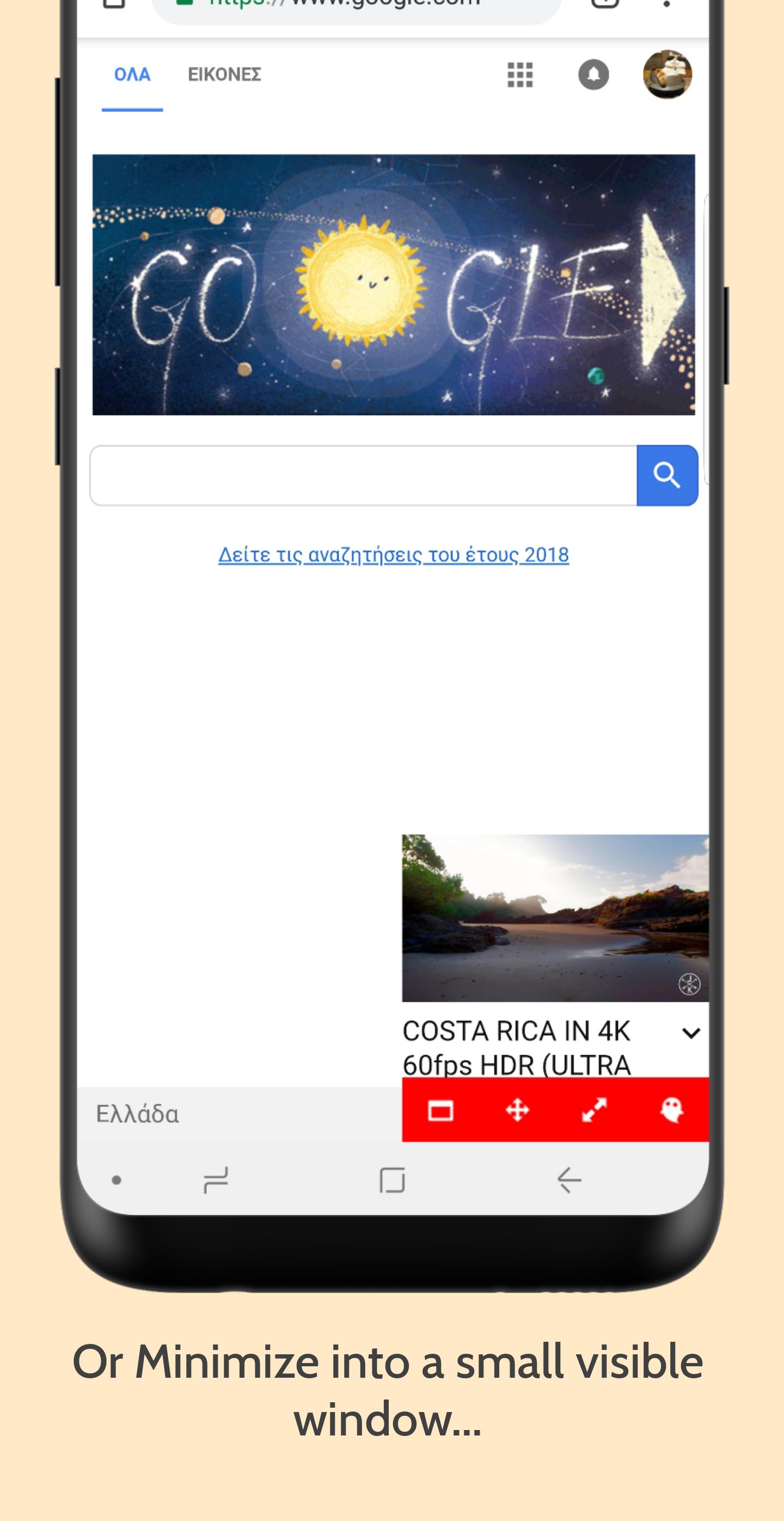
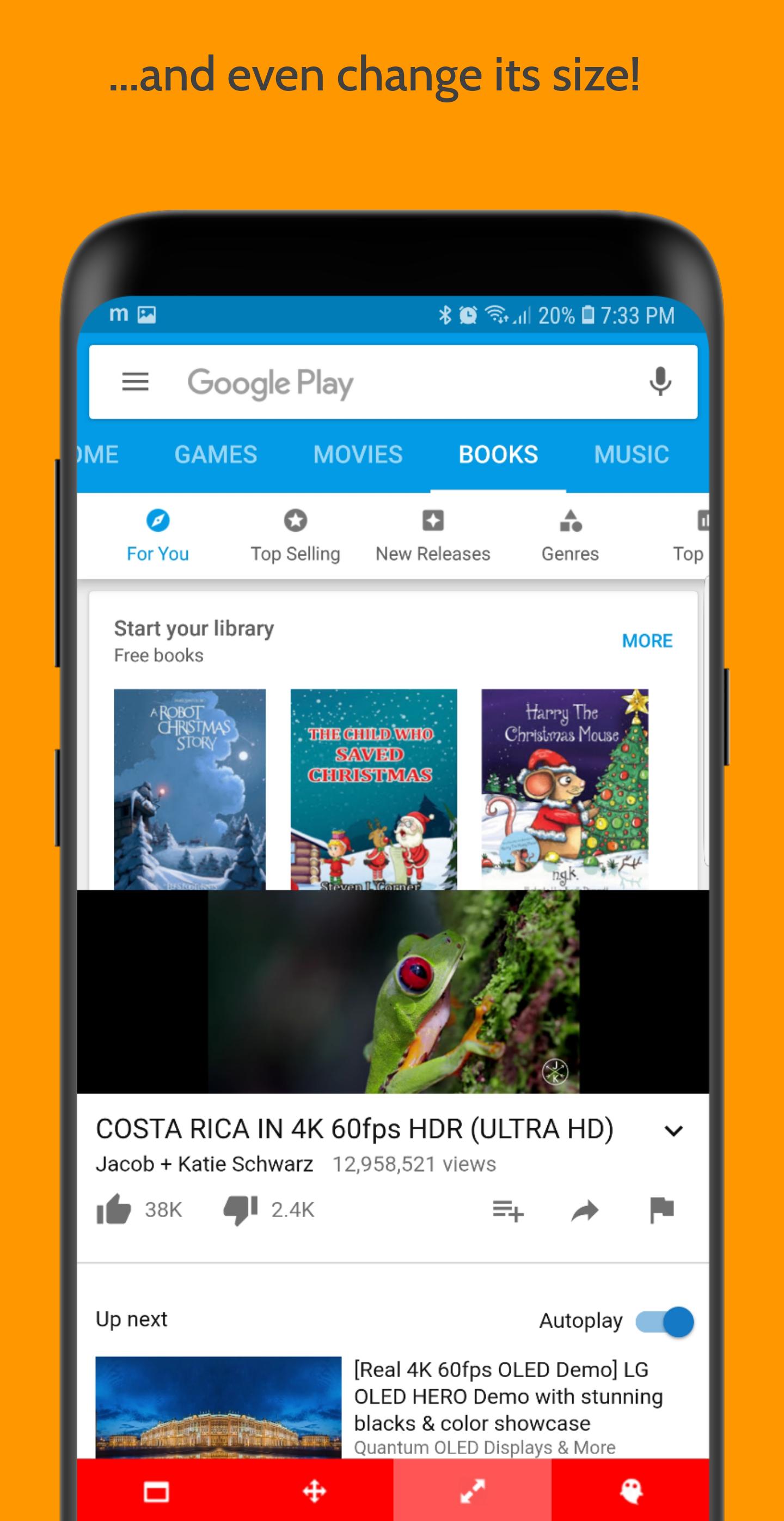
Use the Minimize function to fit YouTube, on a small resizable and movable window in the corner of your screen! Now you can listen to your favorite music playlist, while playing your favorite game, checking your email or perform any other task!
What's New in the Latest Version 8.12.0
Last updated on Jun 23, 2024
• Shuffle button on the intro page of playlists now properly activates shuffle function
• Other minor fixes and improvements
Minimizer for YouTube Classic is a browser extension that enhances the user experience on the classic version of YouTube. It provides a wide range of customization options, allowing users to tailor the platform to their specific preferences.
Key Features:
* Compact Mode: Minimizes the YouTube interface, reducing distractions and maximizing video space.
* Theater Mode: Removes all unnecessary elements, creating an immersive viewing experience.
* Minimal Mode: Simplifies the interface even further, displaying only essential controls.
* Customizable Themes: Allows users to choose from a variety of themes to match their aesthetic preferences.
* Keyboard Shortcuts: Provides customizable keyboard shortcuts for quick and efficient navigation.
* Video Quality Manager: Enables users to set default video quality preferences for optimal viewing.
* Autoplay Control: Gives users control over autoplay behavior, preventing unwanted video playback.
* Ad Blocker: Blocks intrusive advertisements, ensuring an uninterrupted viewing experience.
* Loop Mode: Allows users to loop videos continuously for repetitive tasks or background music.
* Picture-in-Picture: Enables users to watch videos in a floating window while browsing other tabs.
Benefits:
* Enhanced Focus: Minimized interfaces reduce distractions, allowing users to focus on the content they are watching.
* Improved Viewing Experience: Theater mode and custom themes create a more immersive and enjoyable viewing experience.
* Increased Efficiency: Keyboard shortcuts and customizable settings streamline navigation and save time.
* Personalized Experience: Customizable themes and options allow users to tailor YouTube to their individual tastes.
* Enhanced Privacy: Ad blocking protects users from intrusive advertising and potential privacy concerns.
Compatibility:
Minimizer for YouTube Classic is compatible with most major browsers, including Chrome, Firefox, and Edge. It supports the classic version of YouTube and is not compatible with the redesigned YouTube interface.
Installation:
To install Minimizer for YouTube Classic, users can visit the extension store for their respective browser and search for "Minimizer for YouTube Classic." Once installed, the extension can be accessed through the browser toolbar or settings menu.
With Minimizer for YouTube, watch YouTube videos while performing other tasks!
The much requested Classic version of Minimizer for YouTube is back!
• Classic interface with the bottom red bar on every mode.
• Fully compatible with the latest Android versions.
• Improved Ghost Mode.
Minimizer for YouTube Classic is very easy to use.
We brought back the much requested Classic interface with the bottom red bar on every mode.
All main functions are only a touch away! Using the bottom Action Bar when in full screen mode AND when Minimized, YouTube Minimizer Classic makes your life easier. Now you can listen to your favorite music playlist, while playing your favorite game, checking your email or perform any other task!
• Minimize
Minimize YouTube
• Ghost Mode
When minimizing isn’t enough, make YouTube disappear with Ghost Mode!
• Music Mode
Listen to Music only!
• Playlist
Arrange and Manage your YouTube Playlists
• YouTube
Nothing changes! It’s just like the YouTube experience!
With Minimizer for YouTube you can enjoy your favorite YouTube videos on your phone or tablet, while performing other tasks, like browsing the web or checking your Facebook notifications.
Use the Minimize function to fit YouTube, on a small resizable and movable window in the corner of your screen! Now you can listen to your favorite music playlist, while playing your favorite game, checking your email or perform any other task!
What's New in the Latest Version 8.12.0
Last updated on Jun 23, 2024
• Shuffle button on the intro page of playlists now properly activates shuffle function
• Other minor fixes and improvements
Minimizer for YouTube Classic is a browser extension that enhances the user experience on the classic version of YouTube. It provides a wide range of customization options, allowing users to tailor the platform to their specific preferences.
Key Features:
* Compact Mode: Minimizes the YouTube interface, reducing distractions and maximizing video space.
* Theater Mode: Removes all unnecessary elements, creating an immersive viewing experience.
* Minimal Mode: Simplifies the interface even further, displaying only essential controls.
* Customizable Themes: Allows users to choose from a variety of themes to match their aesthetic preferences.
* Keyboard Shortcuts: Provides customizable keyboard shortcuts for quick and efficient navigation.
* Video Quality Manager: Enables users to set default video quality preferences for optimal viewing.
* Autoplay Control: Gives users control over autoplay behavior, preventing unwanted video playback.
* Ad Blocker: Blocks intrusive advertisements, ensuring an uninterrupted viewing experience.
* Loop Mode: Allows users to loop videos continuously for repetitive tasks or background music.
* Picture-in-Picture: Enables users to watch videos in a floating window while browsing other tabs.
Benefits:
* Enhanced Focus: Minimized interfaces reduce distractions, allowing users to focus on the content they are watching.
* Improved Viewing Experience: Theater mode and custom themes create a more immersive and enjoyable viewing experience.
* Increased Efficiency: Keyboard shortcuts and customizable settings streamline navigation and save time.
* Personalized Experience: Customizable themes and options allow users to tailor YouTube to their individual tastes.
* Enhanced Privacy: Ad blocking protects users from intrusive advertising and potential privacy concerns.
Compatibility:
Minimizer for YouTube Classic is compatible with most major browsers, including Chrome, Firefox, and Edge. It supports the classic version of YouTube and is not compatible with the redesigned YouTube interface.
Installation:
To install Minimizer for YouTube Classic, users can visit the extension store for their respective browser and search for "Minimizer for YouTube Classic." Once installed, the extension can be accessed through the browser toolbar or settings menu.





