


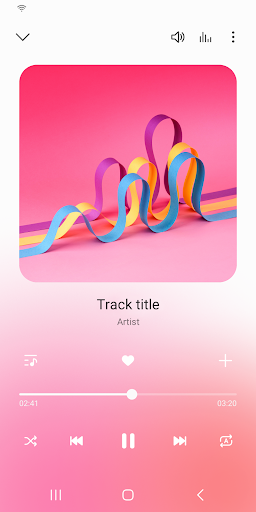
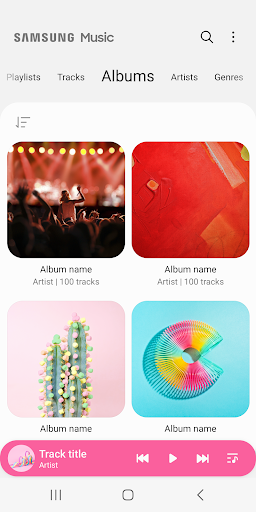
Samsung Music is optimized for Samsung android device and provides a powerful music play functionality and the best user interface.
Key Features
1. Supports playback of various sound formats such as MP3, AAC, FLAC.
(Supported file formats may vary depending on the device.)
2. Helps to effectively manage song lists by categories.(Track,Album,Artist,Genre,Folder,Composer)
3. Provides a clean and intuitive user interface.
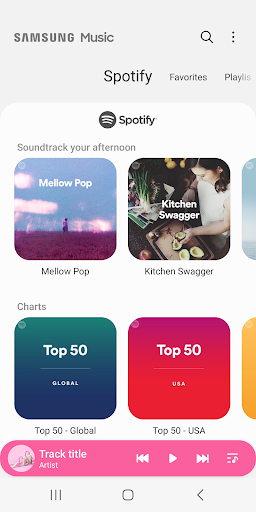
4. The Samsung music shows recommendation of playlists from Spotify. You can find Spotify recommendation music by Spotify tab and search Spotify music you’ll love.
(The Spotify tab is only available in countries where Spotify is on service.)
For further inquiries about Samsung Music, please contact us via the following methods.
* Samsung Music App > More (3 dot) > Settings > Contact US
(In order to use the "Contact us" feature, the Samsung Members app must be installed on the device.)
*** Required App Permissions ***
Below mandatory permission is required for basic features of Samsung Music.
Even if optional permission are denied, basic features may work properly.
[Mandatory Permission]
1. STORAGE permission :
- Allows the player to write,modify,delete to SD card.
- Allows the player to read data from SD card.
[Optional Permission]
2. MICROPHONE permission : Galaxy S4, Note3, Note4 only
- Allows to control the player with voice commands which are listening, not recording.
ex : PLAY,PAUSE,NEXT,PREVIOUS,VOLUME UP,VOLUME DOWN
3. PHONE permission : Korean devices only.
- Verify your phone when using the music service.
4. Notification
- Provide notifications related to Samsung Music.
Samsung Music is a versatile music player app designed exclusively for Samsung devices, offering a comprehensive suite of features to enhance your music listening experience. This guide delves into the app's capabilities, exploring its intuitive interface, advanced playback controls, and seamless integration with Samsung's ecosystem.
Intuitive Interface:
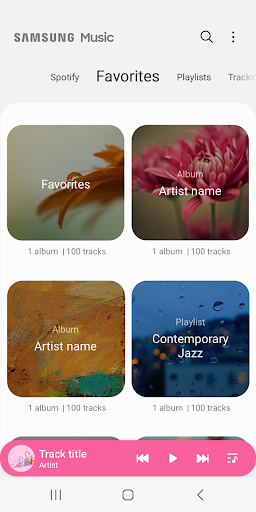
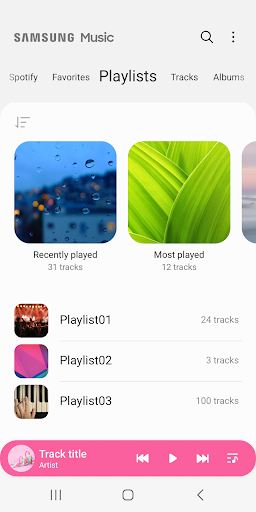
Samsung Music boasts a user-friendly interface that simplifies music navigation. Its clean and organized layout presents your music library in various categories, including albums, artists, genres, and playlists. The app's intuitive design allows you to swiftly browse your collection, discover new music, and access recently played tracks with ease.
Advanced Playback Controls:
Samsung Music provides a comprehensive set of playback controls that empower you to tailor your listening experience. Seamlessly adjust the volume, skip tracks, or rewind using the app's intuitive touch gestures. Utilize the built-in equalizer to fine-tune the audio output to suit your preferences, ensuring optimal sound quality for every genre.
Seamless Integration with Samsung Ecosystem:
Samsung Music seamlessly integrates with Samsung's ecosystem, offering a cohesive experience across your devices. Sync your music library with Samsung Cloud to access your favorite tracks from any Samsung device. Enjoy uninterrupted music playback while using other apps with the app's Picture-in-Picture mode, enabling you to multitask effortlessly.
Additional Features:
* Lyrics Display: Sing along to your favorite songs with Samsung Music's lyrics display feature. Easily access lyrics while listening to music, enhancing your immersion and understanding of the song's message.
* Music Recommendations: Discover new music that aligns with your tastes through Samsung Music's personalized recommendations. The app analyzes your listening habits and suggests similar tracks or artists that you might enjoy.
* Smart Playlists: Automatically generate playlists based on your preferences or listening history. Samsung Music's smart playlists feature analyzes your music library and creates curated playlists that suit your mood or activity.
Conclusion:
Samsung Music is a feature-rich music player app that caters to the diverse needs of music enthusiasts. Its intuitive interface, advanced playback controls, and seamless integration with Samsung's ecosystem make it an ideal choice for Samsung device users. Whether you're a casual listener or an avid audiophile, Samsung Music offers a comprehensive and enjoyable music listening experience.
Samsung Music is optimized for Samsung android device and provides a powerful music play functionality and the best user interface.
Key Features
1. Supports playback of various sound formats such as MP3, AAC, FLAC.
(Supported file formats may vary depending on the device.)
2. Helps to effectively manage song lists by categories.(Track,Album,Artist,Genre,Folder,Composer)
3. Provides a clean and intuitive user interface.
4. The Samsung music shows recommendation of playlists from Spotify. You can find Spotify recommendation music by Spotify tab and search Spotify music you’ll love.
(The Spotify tab is only available in countries where Spotify is on service.)
For further inquiries about Samsung Music, please contact us via the following methods.
* Samsung Music App > More (3 dot) > Settings > Contact US
(In order to use the "Contact us" feature, the Samsung Members app must be installed on the device.)
*** Required App Permissions ***
Below mandatory permission is required for basic features of Samsung Music.
Even if optional permission are denied, basic features may work properly.
[Mandatory Permission]
1. STORAGE permission :
- Allows the player to write,modify,delete to SD card.
- Allows the player to read data from SD card.
[Optional Permission]
2. MICROPHONE permission : Galaxy S4, Note3, Note4 only
- Allows to control the player with voice commands which are listening, not recording.
ex : PLAY,PAUSE,NEXT,PREVIOUS,VOLUME UP,VOLUME DOWN
3. PHONE permission : Korean devices only.
- Verify your phone when using the music service.
4. Notification
- Provide notifications related to Samsung Music.
Samsung Music is a versatile music player app designed exclusively for Samsung devices, offering a comprehensive suite of features to enhance your music listening experience. This guide delves into the app's capabilities, exploring its intuitive interface, advanced playback controls, and seamless integration with Samsung's ecosystem.
Intuitive Interface:
Samsung Music boasts a user-friendly interface that simplifies music navigation. Its clean and organized layout presents your music library in various categories, including albums, artists, genres, and playlists. The app's intuitive design allows you to swiftly browse your collection, discover new music, and access recently played tracks with ease.
Advanced Playback Controls:
Samsung Music provides a comprehensive set of playback controls that empower you to tailor your listening experience. Seamlessly adjust the volume, skip tracks, or rewind using the app's intuitive touch gestures. Utilize the built-in equalizer to fine-tune the audio output to suit your preferences, ensuring optimal sound quality for every genre.
Seamless Integration with Samsung Ecosystem:
Samsung Music seamlessly integrates with Samsung's ecosystem, offering a cohesive experience across your devices. Sync your music library with Samsung Cloud to access your favorite tracks from any Samsung device. Enjoy uninterrupted music playback while using other apps with the app's Picture-in-Picture mode, enabling you to multitask effortlessly.
Additional Features:
* Lyrics Display: Sing along to your favorite songs with Samsung Music's lyrics display feature. Easily access lyrics while listening to music, enhancing your immersion and understanding of the song's message.
* Music Recommendations: Discover new music that aligns with your tastes through Samsung Music's personalized recommendations. The app analyzes your listening habits and suggests similar tracks or artists that you might enjoy.
* Smart Playlists: Automatically generate playlists based on your preferences or listening history. Samsung Music's smart playlists feature analyzes your music library and creates curated playlists that suit your mood or activity.
Conclusion:
Samsung Music is a feature-rich music player app that caters to the diverse needs of music enthusiasts. Its intuitive interface, advanced playback controls, and seamless integration with Samsung's ecosystem make it an ideal choice for Samsung device users. Whether you're a casual listener or an avid audiophile, Samsung Music offers a comprehensive and enjoyable music listening experience.





