


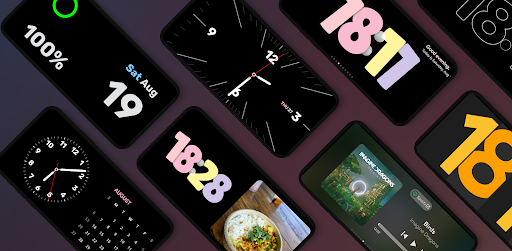
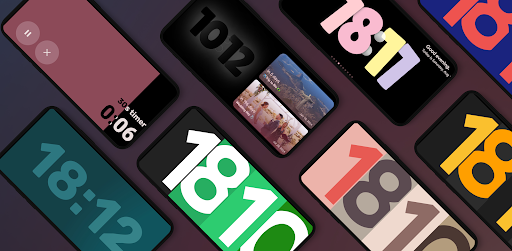
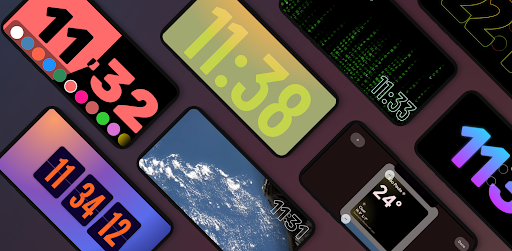
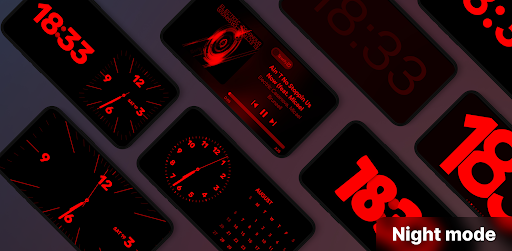
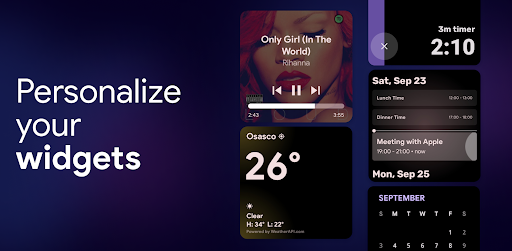
StandBy Mode Pro turns your phone or tablet into a Smart Display while it charges. It's designed with Material Design 3 and smooth animations for an elegant desk or bedside appearance.
Main Features
📅 Duo: Customize and combine widgets for a more efficient workflow. Add, remove and rearrange to fit your needs.
🛏️ Night Mode: a feature that, when activated, applies a red tint to Widgets. This allows for seamless usage in low-light settings, minimizing sleep disruption and excessive light emission. It can also be scheduled with start and end time and customized for your liking.
🛏️ Countdown to Dates: Beautiful widget with countdown dates such as weddings, trips, or any big day!
🎵 Player Widget: Take control of your music with album cover support and beautiful gradients. Enjoy music from your favorite apps (Spotify, Apple Music, Deezer, Youtube Music and more)
📷 Photo Clock & Calendar View: Showcase beautiful images alongside clock and date information or highlight the current date with our Calendar View. This feature uses AI to improve the crop of people.
🗓️ Schedule: Stay organized with a glance at your calendar events.
🌧 Weather:
⏱️ Fullscreen Timer & Analog Clock: From timely reminders to classic elegance, our fullscreen timers and clocks add sophistication to your Android experience.
☀️ Solar Watch: Beautiful combination of gradients shade that will move around the day and get darker during the night following the never ending circle night and day.
🕰️ Multiple Digital and Analog Clocks:
- Solar watch
- Retroflip
- Matrix Watch
- International Space Station Clock that shows live imagery of Earth
- Big Crop Clock inspired on Google Pixel
- Radial Inverter that shifts pixels and it's burn-in protected by design
> Watches contain multiple customization options, giving you hundreds of different options.
📱 Edge-to-Edge Screen Widgets: Set up multiple phone widgets to suit your lifestyle and preferences. Organize your screen effortlessly and elevate your productivity in ways you never thought possible.
📱 Aesthetic Widgets: Express your style with side-by-side Aesthetic Widgets that complement each other beautifully. Personalize your Android experience like never before.
📱 Burn-in protection: Don't worry about keeping the app open for a long time
🔗 Quick Launch: Seamlessly access StandBy Mode Pro when charging your phone in landscape mode, ensuring a smooth and effortless transition.
🔔 Notifications: Receive handy charging notifications to quickly launch StandBy Mode Pro
🕑 Auto Close on Portrait: Enjoy a clutter-free experience as the app automatically closes when your phone switches to portrait mode.
💡 Idle Mode: Keep important information in focus with dimmed widgets during idle periods.
Unlock the true potential of your Android phone and make every moment count with StandBy Mode Pro. Embrace the premium feel of iOS widgets, transform your home screen, and harness the efficiency of a virtual lock screen. Rest assured, this app optimizes battery usage to ensure you maximize your screen-on time.
Discover the perfect iOS standby mode application for your Android device today! Embrace the beauty, elegance, and functionality of iOS 17 with StandBy Mode Pro. Experience Android like never before.
Introduction
StandBy Mode Pro: Always On is an innovative Android application that optimizes battery life by putting the device into a deep sleep state while still allowing essential functions to operate. This advanced power-saving technology extends battery life significantly, making it an ideal solution for users who demand extended usage without frequent charging.
Key Features
* Always On Display: Keeps the screen partially active, displaying essential information such as time, date, notifications, and battery level, while minimizing power consumption.
* Selective App Whitelisting: Users can whitelist specific apps that are allowed to run in the background, ensuring uninterrupted operation of crucial services like messaging and email.
* Advanced Power Management: StandBy Mode Pro analyzes device usage patterns and adjusts power settings accordingly, optimizing battery consumption based on individual needs.
* Scheduled Optimization: Users can set specific time frames for power-saving mode to activate, such as during sleep hours or when the device is not in use.
* Battery Health Monitoring: The app monitors battery health and provides insights into its condition, alerting users to potential issues and suggesting maintenance tips.
How It Works
StandBy Mode Pro operates by putting the device into a deep sleep state, reducing CPU and network activity to a minimum. This state, known as "deep sleep," is more energy-efficient than the typical standby mode, significantly extending battery life. However, the app selectively whitelists certain apps, allowing them to continue running in the background to ensure essential functionality.
Benefits
* Extended Battery Life: By utilizing deep sleep mode and selective app whitelisting, StandBy Mode Pro significantly extends battery life, allowing users to enjoy extended usage without frequent charging.
* Optimized Power Consumption: The app analyzes usage patterns and adjusts power settings accordingly, optimizing battery consumption for each user's individual needs.
* Uninterrupted Essential Services: Whitelisting ensures that crucial services like messaging, email, and notifications continue to operate uninterruptedly, even in power-saving mode.
* Improved Battery Health: The app monitors battery health and provides insights into its condition, helping users maintain optimal battery performance and longevity.
Conclusion
StandBy Mode Pro: Always On is an essential tool for Android users who demand extended battery life without compromising essential functionality. Its advanced power-saving technology, selective app whitelisting, and battery health monitoring features provide a comprehensive solution for optimizing device performance and ensuring uninterrupted usage. Whether for extended gaming sessions, long commutes, or travel, StandBy Mode Pro empowers users to stay connected and productive while minimizing battery consumption.
StandBy Mode Pro turns your phone or tablet into a Smart Display while it charges. It's designed with Material Design 3 and smooth animations for an elegant desk or bedside appearance.
Main Features
📅 Duo: Customize and combine widgets for a more efficient workflow. Add, remove and rearrange to fit your needs.
🛏️ Night Mode: a feature that, when activated, applies a red tint to Widgets. This allows for seamless usage in low-light settings, minimizing sleep disruption and excessive light emission. It can also be scheduled with start and end time and customized for your liking.
🛏️ Countdown to Dates: Beautiful widget with countdown dates such as weddings, trips, or any big day!
🎵 Player Widget: Take control of your music with album cover support and beautiful gradients. Enjoy music from your favorite apps (Spotify, Apple Music, Deezer, Youtube Music and more)
📷 Photo Clock & Calendar View: Showcase beautiful images alongside clock and date information or highlight the current date with our Calendar View. This feature uses AI to improve the crop of people.
🗓️ Schedule: Stay organized with a glance at your calendar events.
🌧 Weather:
⏱️ Fullscreen Timer & Analog Clock: From timely reminders to classic elegance, our fullscreen timers and clocks add sophistication to your Android experience.
☀️ Solar Watch: Beautiful combination of gradients shade that will move around the day and get darker during the night following the never ending circle night and day.
🕰️ Multiple Digital and Analog Clocks:
- Solar watch
- Retroflip
- Matrix Watch
- International Space Station Clock that shows live imagery of Earth
- Big Crop Clock inspired on Google Pixel
- Radial Inverter that shifts pixels and it's burn-in protected by design
> Watches contain multiple customization options, giving you hundreds of different options.
📱 Edge-to-Edge Screen Widgets: Set up multiple phone widgets to suit your lifestyle and preferences. Organize your screen effortlessly and elevate your productivity in ways you never thought possible.
📱 Aesthetic Widgets: Express your style with side-by-side Aesthetic Widgets that complement each other beautifully. Personalize your Android experience like never before.
📱 Burn-in protection: Don't worry about keeping the app open for a long time
🔗 Quick Launch: Seamlessly access StandBy Mode Pro when charging your phone in landscape mode, ensuring a smooth and effortless transition.
🔔 Notifications: Receive handy charging notifications to quickly launch StandBy Mode Pro
🕑 Auto Close on Portrait: Enjoy a clutter-free experience as the app automatically closes when your phone switches to portrait mode.
💡 Idle Mode: Keep important information in focus with dimmed widgets during idle periods.
Unlock the true potential of your Android phone and make every moment count with StandBy Mode Pro. Embrace the premium feel of iOS widgets, transform your home screen, and harness the efficiency of a virtual lock screen. Rest assured, this app optimizes battery usage to ensure you maximize your screen-on time.
Discover the perfect iOS standby mode application for your Android device today! Embrace the beauty, elegance, and functionality of iOS 17 with StandBy Mode Pro. Experience Android like never before.
Introduction
StandBy Mode Pro: Always On is an innovative Android application that optimizes battery life by putting the device into a deep sleep state while still allowing essential functions to operate. This advanced power-saving technology extends battery life significantly, making it an ideal solution for users who demand extended usage without frequent charging.
Key Features
* Always On Display: Keeps the screen partially active, displaying essential information such as time, date, notifications, and battery level, while minimizing power consumption.
* Selective App Whitelisting: Users can whitelist specific apps that are allowed to run in the background, ensuring uninterrupted operation of crucial services like messaging and email.
* Advanced Power Management: StandBy Mode Pro analyzes device usage patterns and adjusts power settings accordingly, optimizing battery consumption based on individual needs.
* Scheduled Optimization: Users can set specific time frames for power-saving mode to activate, such as during sleep hours or when the device is not in use.
* Battery Health Monitoring: The app monitors battery health and provides insights into its condition, alerting users to potential issues and suggesting maintenance tips.
How It Works
StandBy Mode Pro operates by putting the device into a deep sleep state, reducing CPU and network activity to a minimum. This state, known as "deep sleep," is more energy-efficient than the typical standby mode, significantly extending battery life. However, the app selectively whitelists certain apps, allowing them to continue running in the background to ensure essential functionality.
Benefits
* Extended Battery Life: By utilizing deep sleep mode and selective app whitelisting, StandBy Mode Pro significantly extends battery life, allowing users to enjoy extended usage without frequent charging.
* Optimized Power Consumption: The app analyzes usage patterns and adjusts power settings accordingly, optimizing battery consumption for each user's individual needs.
* Uninterrupted Essential Services: Whitelisting ensures that crucial services like messaging, email, and notifications continue to operate uninterruptedly, even in power-saving mode.
* Improved Battery Health: The app monitors battery health and provides insights into its condition, helping users maintain optimal battery performance and longevity.
Conclusion
StandBy Mode Pro: Always On is an essential tool for Android users who demand extended battery life without compromising essential functionality. Its advanced power-saving technology, selective app whitelisting, and battery health monitoring features provide a comprehensive solution for optimizing device performance and ensuring uninterrupted usage. Whether for extended gaming sessions, long commutes, or travel, StandBy Mode Pro empowers users to stay connected and productive while minimizing battery consumption.





