


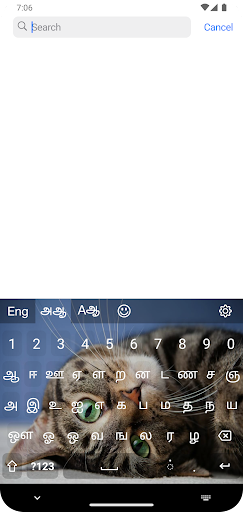
Tamil smart mobile keyboard
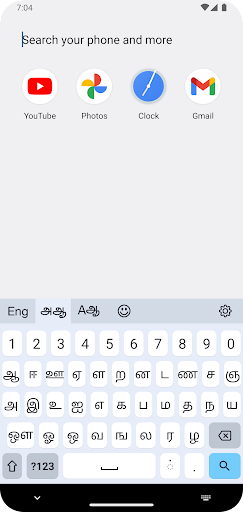
Tamil smart mobile keyboard is the most user-friendly and easy-to-use native Tamil Unicode typing app available in the Google Play Store.
This application supports any Android phone model with Android version 10 or above.
- Pre-requirements:
This app needs your phone to support Tamil Unicode fonts. This app will not be installing any Tamil Unicode into your device, so if you don't have Tamil Unicode please install Tamil Unicode support first.
Tamil Keyboard app will integrate the keyboard into the Android operating system, so you'll have access to the keyboard from any application, such as Facebook, X, Viber, WhatsApp, or any other application on your Android device.
How to activate the Tamil keyboard,
**** quick method ****
1) Tap on the `Activate this keyboard` option on the home screen
2) Select and Enable `Tamil ` on the On-screen keyboard section
3) Press OK to confirm
4) Switch to the Tamil keyboard from the keyboard switcher on any text field
5) Start typing...
**** long and boring method **** (steps may be changed with different OS versions)
1) Open 'System Settings' and go to 'System'
2) Go to 'Language & input'
3) Tap on 'On-screen keyboard'
4) Select and Enable `Tamil ` on the On-screen keyboard section
5) Press OK to confirm
6) Switch to the Tamil keyboard from the keyboard switcher on any text field
7) Start typing...
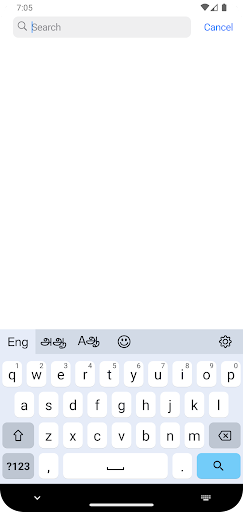
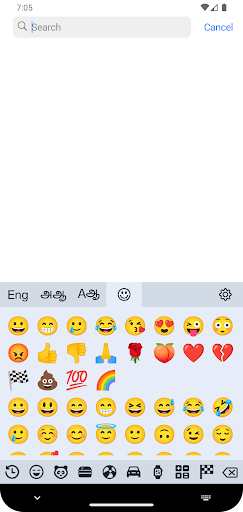
You can switch between 'Tamil' and other keyboards from any application.
Please get in touch with us via our Facebook page for more details.
Recommended Android versions - 10.0 or higher
This application will not collect any information from the app's users.
Tamil Smart Keyboard is a user-friendly and comprehensive keyboard application designed to enhance the typing experience for Tamil language users. It offers a wide range of features to simplify and expedite the input of Tamil characters, making it an indispensable tool for communication, content creation, and language learning.
Seamless Tamil Typing
The keyboard features a well-organized layout that allows users to effortlessly locate and input Tamil characters. The keys are logically arranged based on their frequency of use, enabling swift and intuitive typing. Additionally, the keyboard supports various input methods, including transliteration, phonetic typing, and handwriting recognition, catering to different user preferences and skill levels.
Predictive Text and Autocorrect
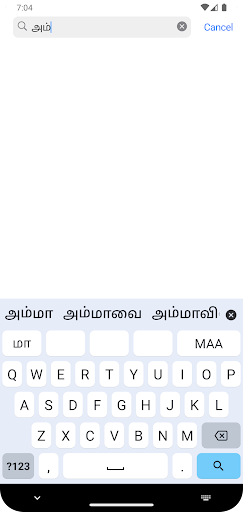
Tamil Smart Keyboard incorporates advanced predictive text and autocorrect capabilities. As users type, the keyboard suggests contextually relevant words and phrases, reducing the need for manual input and minimizing typing errors. This feature significantly improves typing efficiency and accuracy, especially for longer and complex sentences.
Rich Vocabulary and Grammar Support
The keyboard boasts an extensive vocabulary database that encompasses both modern and archaic Tamil words. It also includes comprehensive grammar support, providing users with suggestions for correct word forms, conjugations, and declensions. This ensures that users can express themselves accurately and fluently in written Tamil.
Customization and Personalization
Tamil Smart Keyboard offers a range of customization options to suit individual preferences. Users can adjust the keyboard size, layout, and theme to create a personalized typing experience. The keyboard also allows users to create custom dictionaries, adding frequently used words or phrases for quick and easy access.
Educational Resources
Beyond its typing capabilities, Tamil Smart Keyboard also serves as an educational tool. It includes an integrated Tamil dictionary that provides definitions, synonyms, and usage examples for words. Additionally, the keyboard offers interactive lessons and exercises to help users improve their Tamil language skills.
Compatibility and Integration
Tamil Smart Keyboard is compatible with a wide range of mobile and desktop platforms, including Android, iOS, Windows, and macOS. It seamlessly integrates with various messaging, email, and social media applications, allowing users to effortlessly type in Tamil across different platforms.
Empowering Tamil Language Communication
Tamil Smart Keyboard empowers Tamil language users by providing a comprehensive and user-friendly typing experience. Its advanced features, rich vocabulary, and educational resources make it an essential tool for anyone seeking to communicate effectively, create compelling content, or enhance their Tamil language skills.
Tamil smart mobile keyboard
Tamil smart mobile keyboard is the most user-friendly and easy-to-use native Tamil Unicode typing app available in the Google Play Store.
This application supports any Android phone model with Android version 10 or above.
- Pre-requirements:
This app needs your phone to support Tamil Unicode fonts. This app will not be installing any Tamil Unicode into your device, so if you don't have Tamil Unicode please install Tamil Unicode support first.
Tamil Keyboard app will integrate the keyboard into the Android operating system, so you'll have access to the keyboard from any application, such as Facebook, X, Viber, WhatsApp, or any other application on your Android device.
How to activate the Tamil keyboard,
**** quick method ****
1) Tap on the `Activate this keyboard` option on the home screen
2) Select and Enable `Tamil ` on the On-screen keyboard section
3) Press OK to confirm
4) Switch to the Tamil keyboard from the keyboard switcher on any text field
5) Start typing...
**** long and boring method **** (steps may be changed with different OS versions)
1) Open 'System Settings' and go to 'System'
2) Go to 'Language & input'
3) Tap on 'On-screen keyboard'
4) Select and Enable `Tamil ` on the On-screen keyboard section
5) Press OK to confirm
6) Switch to the Tamil keyboard from the keyboard switcher on any text field
7) Start typing...
You can switch between 'Tamil' and other keyboards from any application.
Please get in touch with us via our Facebook page for more details.
Recommended Android versions - 10.0 or higher
This application will not collect any information from the app's users.
Tamil Smart Keyboard is a user-friendly and comprehensive keyboard application designed to enhance the typing experience for Tamil language users. It offers a wide range of features to simplify and expedite the input of Tamil characters, making it an indispensable tool for communication, content creation, and language learning.
Seamless Tamil Typing
The keyboard features a well-organized layout that allows users to effortlessly locate and input Tamil characters. The keys are logically arranged based on their frequency of use, enabling swift and intuitive typing. Additionally, the keyboard supports various input methods, including transliteration, phonetic typing, and handwriting recognition, catering to different user preferences and skill levels.
Predictive Text and Autocorrect
Tamil Smart Keyboard incorporates advanced predictive text and autocorrect capabilities. As users type, the keyboard suggests contextually relevant words and phrases, reducing the need for manual input and minimizing typing errors. This feature significantly improves typing efficiency and accuracy, especially for longer and complex sentences.
Rich Vocabulary and Grammar Support
The keyboard boasts an extensive vocabulary database that encompasses both modern and archaic Tamil words. It also includes comprehensive grammar support, providing users with suggestions for correct word forms, conjugations, and declensions. This ensures that users can express themselves accurately and fluently in written Tamil.
Customization and Personalization
Tamil Smart Keyboard offers a range of customization options to suit individual preferences. Users can adjust the keyboard size, layout, and theme to create a personalized typing experience. The keyboard also allows users to create custom dictionaries, adding frequently used words or phrases for quick and easy access.
Educational Resources
Beyond its typing capabilities, Tamil Smart Keyboard also serves as an educational tool. It includes an integrated Tamil dictionary that provides definitions, synonyms, and usage examples for words. Additionally, the keyboard offers interactive lessons and exercises to help users improve their Tamil language skills.
Compatibility and Integration
Tamil Smart Keyboard is compatible with a wide range of mobile and desktop platforms, including Android, iOS, Windows, and macOS. It seamlessly integrates with various messaging, email, and social media applications, allowing users to effortlessly type in Tamil across different platforms.
Empowering Tamil Language Communication
Tamil Smart Keyboard empowers Tamil language users by providing a comprehensive and user-friendly typing experience. Its advanced features, rich vocabulary, and educational resources make it an essential tool for anyone seeking to communicate effectively, create compelling content, or enhance their Tamil language skills.





