

A Remote Control for the HomeMatic(©) Home Automation System
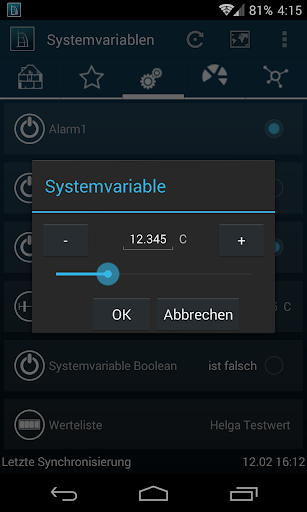
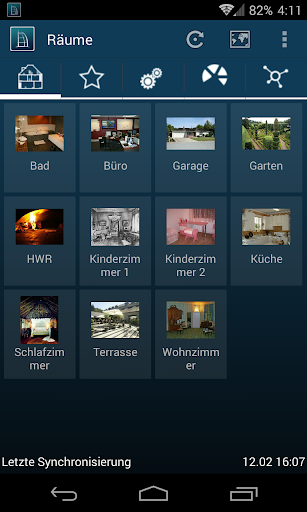
Support for Rooms, Categories, System Variables, Favourites and Scripts
Support for 99% of all HomeMatic and HomeMatic IP devices
Synchronized Status Updates
Choose Custom Icons for Rooms, Categories and Devices
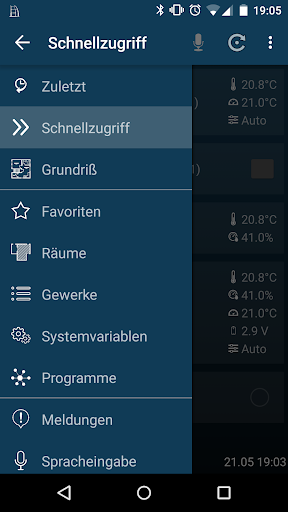
Add devices to sortable quick access
Support for CloudMatic
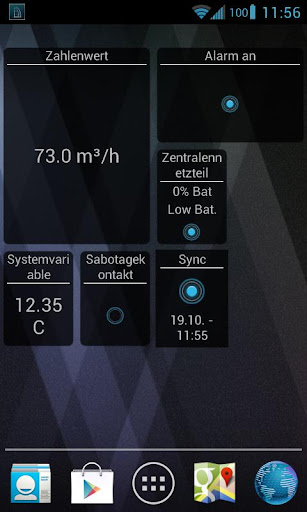
Homescreen Widgets
TinyMatic requires either the CCU1, CCU2, CCU3 or RaspberryMatic and XML-API-Patch needs to be installed on this device. TinyMatic is not affiliated with eQ-3. For more Information visit www.tinymatic.de
TinyMatic is commercial Software. You can send a limited number of commands to the CCU before the App needs to be unlocked. Synchronization is still possible after the command limit is reached. Reinstall to reset the limit.
TinyMatic also has a backup functionality to external storage as one of it's core features.
Overview
TinyMatic is an Android application that allows users to control their Homematic CCU (Central Control Unit) and associated devices remotely. It provides a user-friendly interface for managing and automating smart home devices, offering a range of features to enhance convenience and security.
Key Features
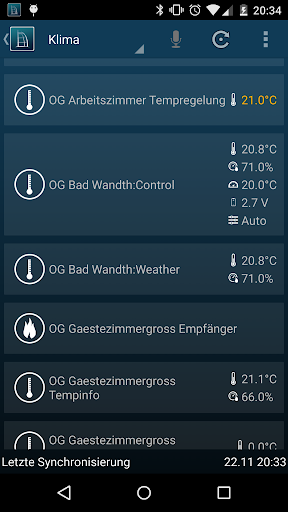
* Device Management: TinyMatic enables users to view and control all Homematic devices connected to their CCU, including lights, switches, sensors, and thermostats. Users can access device status, change settings, and trigger actions remotely.
* Scene Creation: The app allows users to create and manage scenes that control multiple devices simultaneously. Scenes can be triggered manually or automatically based on schedules or events.
* Automation Rules: TinyMatic supports the creation of automation rules that define conditions and actions. These rules can automate tasks such as turning on lights at sunset or sending notifications when sensors detect motion.
* Remote Access: Users can access their Homematic system remotely from anywhere with an internet connection. This allows them to monitor and control their home even when away.
* Notifications: The app sends push notifications to users' smartphones when events occur, such as when a door is opened or a sensor detects smoke. This provides real-time alerts and allows for prompt response.
User Interface
TinyMatic features a clean and intuitive user interface that makes it easy to navigate and manage devices. The home screen provides a quick overview of the system status, including the number of connected devices and any active notifications.
Compatibility
TinyMatic is compatible with all Homematic CCU models, including the CCU2, CCU3, and Homematic IP Access Point. It requires an Android device running version 4.4 or higher.
Benefits
* Convenience: Remote access and automation features allow users to manage their smart home from anywhere, saving time and effort.
* Security: Notifications and the ability to control devices remotely enhance home security by providing alerts and enabling prompt response.
* Energy Efficiency: Automation rules can optimize energy consumption by turning off lights or adjusting thermostats based on schedules or occupancy.
* Customization: Users can tailor their smart home system to their specific needs by creating custom scenes and automation rules.
Conclusion
TinyMatic is a comprehensive and user-friendly app that empowers users to control and automate their Homematic smart home system remotely. Its range of features, intuitive interface, and compatibility with all Homematic CCU models make it an essential tool for anyone looking to enhance their smart home experience.
A Remote Control for the HomeMatic(©) Home Automation System
Support for Rooms, Categories, System Variables, Favourites and Scripts
Support for 99% of all HomeMatic and HomeMatic IP devices
Synchronized Status Updates
Choose Custom Icons for Rooms, Categories and Devices
Add devices to sortable quick access
Support for CloudMatic
Homescreen Widgets
TinyMatic requires either the CCU1, CCU2, CCU3 or RaspberryMatic and XML-API-Patch needs to be installed on this device. TinyMatic is not affiliated with eQ-3. For more Information visit www.tinymatic.de
TinyMatic is commercial Software. You can send a limited number of commands to the CCU before the App needs to be unlocked. Synchronization is still possible after the command limit is reached. Reinstall to reset the limit.
TinyMatic also has a backup functionality to external storage as one of it's core features.
Overview
TinyMatic is an Android application that allows users to control their Homematic CCU (Central Control Unit) and associated devices remotely. It provides a user-friendly interface for managing and automating smart home devices, offering a range of features to enhance convenience and security.
Key Features
* Device Management: TinyMatic enables users to view and control all Homematic devices connected to their CCU, including lights, switches, sensors, and thermostats. Users can access device status, change settings, and trigger actions remotely.
* Scene Creation: The app allows users to create and manage scenes that control multiple devices simultaneously. Scenes can be triggered manually or automatically based on schedules or events.
* Automation Rules: TinyMatic supports the creation of automation rules that define conditions and actions. These rules can automate tasks such as turning on lights at sunset or sending notifications when sensors detect motion.
* Remote Access: Users can access their Homematic system remotely from anywhere with an internet connection. This allows them to monitor and control their home even when away.
* Notifications: The app sends push notifications to users' smartphones when events occur, such as when a door is opened or a sensor detects smoke. This provides real-time alerts and allows for prompt response.
User Interface
TinyMatic features a clean and intuitive user interface that makes it easy to navigate and manage devices. The home screen provides a quick overview of the system status, including the number of connected devices and any active notifications.
Compatibility
TinyMatic is compatible with all Homematic CCU models, including the CCU2, CCU3, and Homematic IP Access Point. It requires an Android device running version 4.4 or higher.
Benefits
* Convenience: Remote access and automation features allow users to manage their smart home from anywhere, saving time and effort.
* Security: Notifications and the ability to control devices remotely enhance home security by providing alerts and enabling prompt response.
* Energy Efficiency: Automation rules can optimize energy consumption by turning off lights or adjusting thermostats based on schedules or occupancy.
* Customization: Users can tailor their smart home system to their specific needs by creating custom scenes and automation rules.
Conclusion
TinyMatic is a comprehensive and user-friendly app that empowers users to control and automate their Homematic smart home system remotely. Its range of features, intuitive interface, and compatibility with all Homematic CCU models make it an essential tool for anyone looking to enhance their smart home experience.





