

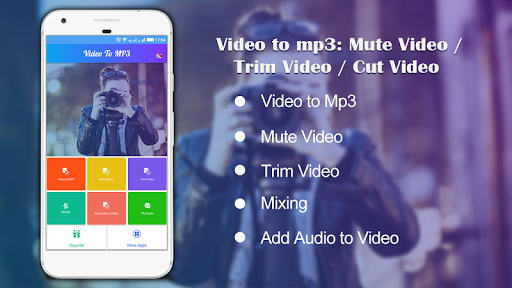

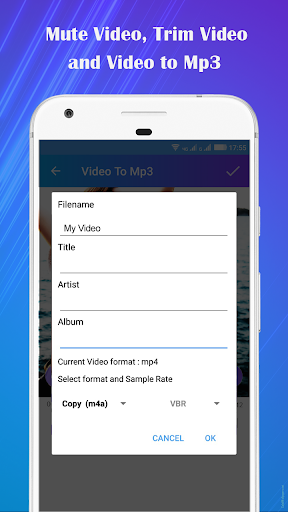
Convert any Video file to Audio file in MP3 format with Video to MP3 converter. Remove Audio from Video(Create Mute Video). Trim Video of any format, size & duration with same quality Output. Mix Audio with Video and Add Audio to Video.
No hidden cost. App is free to use.
Features-
* Video to Mp3 converter - Extract Audio from Video of any format and save as Mp3 file in your device. It is the easiest-to-use mp3 converter and video converter. Easily convert video to mp3.
* Mute Video - Wanna remove audio from Video? Use this app to Mute Video , voice mute and remove unwanted Audio from your Video. Create best quality mute videos.
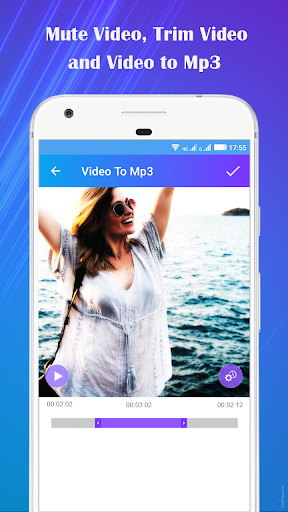
* Trim Video - Easily select the part of Video you wanna trim and get same quality output Trimmed Video using this video trimmer. Use this easy to use video cutter.
* Add Audio To Video - Best Audio Video Mixer to change video background music. Change video sound .
* Mixing - Add music to video easily and do audio video mixing with this video music adder .
* Supports Video formats including MP4, WMV, 3GP, AVI, MPG, M4V, MPEG4, MOV, MKV, WEBM, M2V, etc.
* Best Quality Output.
* Fast Processing. Mute and Trim video in approx. no time. Fast Video to Mp3 Conversion.
*Easy to use with Intractive UI.
* Output Gallery to see created output files. Share and Delete output files easily.
App uses FFmpeg under permission of LGPL.
We welcome feedback so if you have any suggestions or problems with the app, contact us at : [email protected]. We always try to upgrade to give you the best experience.
Download this awesome app to experience best Video Editing Features. 😊
Overview
Video to MP3: Mute Trim Mix is a versatile audio editing application designed for converting videos to audio files (MP3 format) while offering advanced features for editing and enhancing the audio content.
Features
* Video to MP3 Conversion: Convert videos from various formats (MP4, AVI, MOV, etc.) into high-quality MP3 audio files.
* Mute Unwanted Sections: Silence specific segments of the audio using the "Mute" tool, allowing for precise removal of unwanted noises or pauses.
* Trim Audio: Cut out specific portions of the audio to create shorter clips or remove unnecessary segments.
* Audio Mixing: Combine multiple audio tracks or add background music to enhance the audio experience.
* Noise Reduction: Minimize background noise and enhance audio clarity using the noise reduction feature.
* Volume Adjustment: Control the overall volume level or adjust specific sections to balance the audio.
* Equalizer: Fine-tune the audio by adjusting the frequency bands with the built-in equalizer.
* Effects: Apply various audio effects, such as fade-in/out, reverb, and chorus, to add depth and interest to the sound.
* ID3 Tag Editor: Edit and add metadata to the MP3 files, including artist, title, album, and artwork.
User Interface
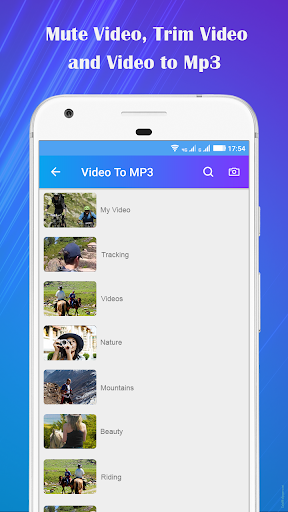
Video to MP3: Mute Trim Mix features an intuitive and user-friendly interface. The main window provides clear access to all the editing tools and options, making it easy for users of all levels to navigate and edit their audio files.
Usage
1. Import the video file you wish to convert to MP3.
2. Use the "Mute" tool to silence any unwanted sections of the audio.
3. Trim the audio to the desired length or remove specific segments.
4. Adjust the volume, apply effects, and fine-tune the audio using the equalizer.
5. Mix multiple audio tracks or add background music to enhance the sound.
6. Export the final audio as an MP3 file with customized ID3 tags.
Benefits
* Convert videos to high-quality MP3 files with ease.
* Precisely remove unwanted audio segments using the "Mute" tool.
* Create shorter clips or remove unnecessary sections with the trim feature.
* Enhance audio quality with noise reduction, volume adjustment, and equalization.
* Add depth and interest to the audio using various audio effects.
* Organize and manage MP3 files with the ID3 tag editor.
Convert any Video file to Audio file in MP3 format with Video to MP3 converter. Remove Audio from Video(Create Mute Video). Trim Video of any format, size & duration with same quality Output. Mix Audio with Video and Add Audio to Video.
No hidden cost. App is free to use.
Features-
* Video to Mp3 converter - Extract Audio from Video of any format and save as Mp3 file in your device. It is the easiest-to-use mp3 converter and video converter. Easily convert video to mp3.
* Mute Video - Wanna remove audio from Video? Use this app to Mute Video , voice mute and remove unwanted Audio from your Video. Create best quality mute videos.
* Trim Video - Easily select the part of Video you wanna trim and get same quality output Trimmed Video using this video trimmer. Use this easy to use video cutter.
* Add Audio To Video - Best Audio Video Mixer to change video background music. Change video sound .
* Mixing - Add music to video easily and do audio video mixing with this video music adder .
* Supports Video formats including MP4, WMV, 3GP, AVI, MPG, M4V, MPEG4, MOV, MKV, WEBM, M2V, etc.
* Best Quality Output.
* Fast Processing. Mute and Trim video in approx. no time. Fast Video to Mp3 Conversion.
*Easy to use with Intractive UI.
* Output Gallery to see created output files. Share and Delete output files easily.
App uses FFmpeg under permission of LGPL.
We welcome feedback so if you have any suggestions or problems with the app, contact us at : [email protected]. We always try to upgrade to give you the best experience.
Download this awesome app to experience best Video Editing Features. 😊
Overview
Video to MP3: Mute Trim Mix is a versatile audio editing application designed for converting videos to audio files (MP3 format) while offering advanced features for editing and enhancing the audio content.
Features
* Video to MP3 Conversion: Convert videos from various formats (MP4, AVI, MOV, etc.) into high-quality MP3 audio files.
* Mute Unwanted Sections: Silence specific segments of the audio using the "Mute" tool, allowing for precise removal of unwanted noises or pauses.
* Trim Audio: Cut out specific portions of the audio to create shorter clips or remove unnecessary segments.
* Audio Mixing: Combine multiple audio tracks or add background music to enhance the audio experience.
* Noise Reduction: Minimize background noise and enhance audio clarity using the noise reduction feature.
* Volume Adjustment: Control the overall volume level or adjust specific sections to balance the audio.
* Equalizer: Fine-tune the audio by adjusting the frequency bands with the built-in equalizer.
* Effects: Apply various audio effects, such as fade-in/out, reverb, and chorus, to add depth and interest to the sound.
* ID3 Tag Editor: Edit and add metadata to the MP3 files, including artist, title, album, and artwork.
User Interface
Video to MP3: Mute Trim Mix features an intuitive and user-friendly interface. The main window provides clear access to all the editing tools and options, making it easy for users of all levels to navigate and edit their audio files.
Usage
1. Import the video file you wish to convert to MP3.
2. Use the "Mute" tool to silence any unwanted sections of the audio.
3. Trim the audio to the desired length or remove specific segments.
4. Adjust the volume, apply effects, and fine-tune the audio using the equalizer.
5. Mix multiple audio tracks or add background music to enhance the sound.
6. Export the final audio as an MP3 file with customized ID3 tags.
Benefits
* Convert videos to high-quality MP3 files with ease.
* Precisely remove unwanted audio segments using the "Mute" tool.
* Create shorter clips or remove unnecessary sections with the trim feature.
* Enhance audio quality with noise reduction, volume adjustment, and equalization.
* Add depth and interest to the audio using various audio effects.
* Organize and manage MP3 files with the ID3 tag editor.





