


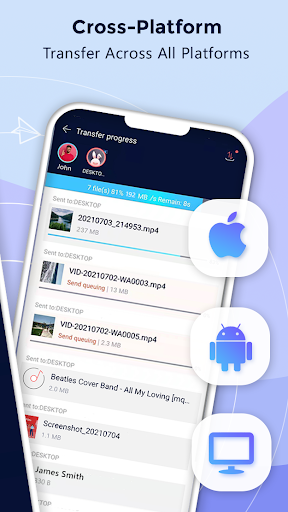
When you use Zapya, you can rapidly share files of ANY size and of ANY format to ALL platform no matter if you are offline or online. You can transfer files from Android and iOS devices, and/or your computers (Windows PC and Mac) without using Wi-Fi or mobile data when you share offline with Zapya. Transferring files now is super easy!
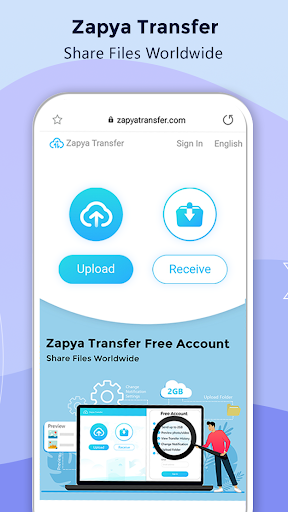
Also, when you share online using Zapya, you can transfer files from any device that has a web browser. By clicking on the Zapya Transfer icon on the Transfer page, you can easily share files with people from all around the world. Zapya Transfer is free to use and available in multiple languages.
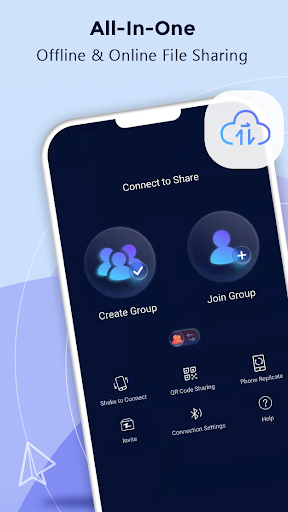
Zapya provides four convenient offline sharing methods, allowing you to share files with people nearby:
1. Create a group and inviting others to join it,
2. Create a personalized QR code for others to scan,
3. Shake to connect to another device,
4. Send files to those nearby with the radar
Spotlight Features
⚡ Expand Storage with USB drives
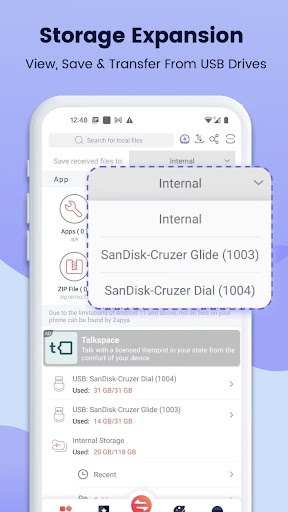
Zapya provides a new feature of USB storage and transfer. You can connect a single USB drive or multiple USB drives through a hub to your device, so you can view files on, save files to and send files from the USB drives!
⚡ Enhanced APP Sharing
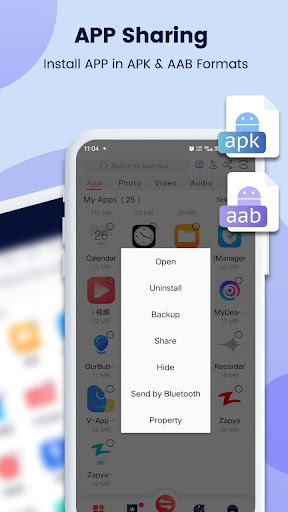
Now Zapya helps you to share and install apps (an action called side-loading) in the old .apk format and new .aab format to friends nearby or on social media.
⚡ Improved Android Support
Zapya supports the scoped storage so that users of Android 11 or higher can safely send and receive files. Additionally, Zapya continues to support devices that run Android 5 through Android 13.
⚡ Upgraded iOS to Android Sharing
Connecting your iOS to an Android device just got easier! Now you can search for a Zapya group created on an Android device and connect with a single click on Zapya.
⚡ Phone Replication
Instantly back up and easily transfer all the content and data from your old device to a new one.
⚡ Bulk File Transfer
Share entire folders or multiple large files at once with just one click!
⚡ “Install All”
Simultaneously download all the apps you want onto your device with the “Install All” feature.
✔ To learn why Zapya requires so many permissions, please visit:
https://youtu.be/o370YTbCdWc
✔ To read Zapya’s Privacy Policy in English, please visit:
https://zapya.app/policy_en.html
✔ For the application’s complete terms and conditions, please visit: https://www.zapya.app/v3/terms_of_service.html
✔ To download Zapya on other platforms, please visit:
https://www.zapya.app/v3/download
✔ For the latest news and updates, please visit:
http://blog.izapya.com/
Zapya is a versatile and user-friendly file-sharing application that enables seamless transfer of files between devices, regardless of their operating systems or proximity. Its intuitive interface and advanced features make it a highly efficient tool for sharing data, ranging from documents and images to videos and music.
Key Features and Benefits:
* Cross-Platform Compatibility: Zapya seamlessly supports a wide range of platforms, including Android, iOS, Windows, and macOS, allowing effortless file sharing between devices running different operating systems.
* Offline File Transfer: One of the standout features of Zapya is its ability to transfer files offline, eliminating the need for an internet connection. This makes it an ideal solution for sharing files in areas with limited or no internet access.
* High Transfer Speed: Zapya utilizes advanced file transfer protocols to achieve blazing-fast transfer speeds, significantly reducing the time required to share large files.
* Group Sharing: Zapya facilitates easy file sharing within groups, allowing multiple users to share files simultaneously with each other. This feature is particularly useful for collaboration and sharing large files among teams.
* Security and Privacy: Zapya prioritizes the security and privacy of its users. It employs end-to-end encryption to protect files during transfer, ensuring that they remain secure and confidential.
Ease of Use:
Zapya is designed with simplicity in mind. Its user interface is intuitive and straightforward, making it accessible to users of all levels of technical expertise. The app provides clear instructions and prompts to guide users through the file-sharing process.
Additional Features:
In addition to its core file-sharing capabilities, Zapya offers a range of additional features that enhance its functionality:
* QR Code Scanning: Zapya allows users to connect devices quickly and easily by scanning QR codes.
* File Management: The app provides basic file management capabilities, enabling users to organize, rename, and delete files.
* Music and Video Player: Zapya integrates a built-in music and video player, allowing users to play and stream media files directly from the app.
Conclusion:
Zapya - File Transfer, Share is a comprehensive and highly effective file-sharing solution that meets the diverse needs of users. Its cross-platform compatibility, offline file transfer capabilities, high transfer speeds, and intuitive interface make it an ideal choice for sharing files quickly, easily, and securely.
When you use Zapya, you can rapidly share files of ANY size and of ANY format to ALL platform no matter if you are offline or online. You can transfer files from Android and iOS devices, and/or your computers (Windows PC and Mac) without using Wi-Fi or mobile data when you share offline with Zapya. Transferring files now is super easy!
Also, when you share online using Zapya, you can transfer files from any device that has a web browser. By clicking on the Zapya Transfer icon on the Transfer page, you can easily share files with people from all around the world. Zapya Transfer is free to use and available in multiple languages.
Zapya provides four convenient offline sharing methods, allowing you to share files with people nearby:
1. Create a group and inviting others to join it,
2. Create a personalized QR code for others to scan,
3. Shake to connect to another device,
4. Send files to those nearby with the radar
Spotlight Features
⚡ Expand Storage with USB drives
Zapya provides a new feature of USB storage and transfer. You can connect a single USB drive or multiple USB drives through a hub to your device, so you can view files on, save files to and send files from the USB drives!
⚡ Enhanced APP Sharing
Now Zapya helps you to share and install apps (an action called side-loading) in the old .apk format and new .aab format to friends nearby or on social media.
⚡ Improved Android Support
Zapya supports the scoped storage so that users of Android 11 or higher can safely send and receive files. Additionally, Zapya continues to support devices that run Android 5 through Android 13.
⚡ Upgraded iOS to Android Sharing
Connecting your iOS to an Android device just got easier! Now you can search for a Zapya group created on an Android device and connect with a single click on Zapya.
⚡ Phone Replication
Instantly back up and easily transfer all the content and data from your old device to a new one.
⚡ Bulk File Transfer
Share entire folders or multiple large files at once with just one click!
⚡ “Install All”
Simultaneously download all the apps you want onto your device with the “Install All” feature.
✔ To learn why Zapya requires so many permissions, please visit:
https://youtu.be/o370YTbCdWc
✔ To read Zapya’s Privacy Policy in English, please visit:
https://zapya.app/policy_en.html
✔ For the application’s complete terms and conditions, please visit: https://www.zapya.app/v3/terms_of_service.html
✔ To download Zapya on other platforms, please visit:
https://www.zapya.app/v3/download
✔ For the latest news and updates, please visit:
http://blog.izapya.com/
Zapya is a versatile and user-friendly file-sharing application that enables seamless transfer of files between devices, regardless of their operating systems or proximity. Its intuitive interface and advanced features make it a highly efficient tool for sharing data, ranging from documents and images to videos and music.
Key Features and Benefits:
* Cross-Platform Compatibility: Zapya seamlessly supports a wide range of platforms, including Android, iOS, Windows, and macOS, allowing effortless file sharing between devices running different operating systems.
* Offline File Transfer: One of the standout features of Zapya is its ability to transfer files offline, eliminating the need for an internet connection. This makes it an ideal solution for sharing files in areas with limited or no internet access.
* High Transfer Speed: Zapya utilizes advanced file transfer protocols to achieve blazing-fast transfer speeds, significantly reducing the time required to share large files.
* Group Sharing: Zapya facilitates easy file sharing within groups, allowing multiple users to share files simultaneously with each other. This feature is particularly useful for collaboration and sharing large files among teams.
* Security and Privacy: Zapya prioritizes the security and privacy of its users. It employs end-to-end encryption to protect files during transfer, ensuring that they remain secure and confidential.
Ease of Use:
Zapya is designed with simplicity in mind. Its user interface is intuitive and straightforward, making it accessible to users of all levels of technical expertise. The app provides clear instructions and prompts to guide users through the file-sharing process.
Additional Features:
In addition to its core file-sharing capabilities, Zapya offers a range of additional features that enhance its functionality:
* QR Code Scanning: Zapya allows users to connect devices quickly and easily by scanning QR codes.
* File Management: The app provides basic file management capabilities, enabling users to organize, rename, and delete files.
* Music and Video Player: Zapya integrates a built-in music and video player, allowing users to play and stream media files directly from the app.
Conclusion:
Zapya - File Transfer, Share is a comprehensive and highly effective file-sharing solution that meets the diverse needs of users. Its cross-platform compatibility, offline file transfer capabilities, high transfer speeds, and intuitive interface make it an ideal choice for sharing files quickly, easily, and securely.





